

TypeScript 기본기 다지기
Table of Content
TypeScript 기초

TypeScript Tutorials
Related Posts
Search
TypeScript 기초
TypeScript Tutorials

[TypeScript] 0. TypeScript 들어가기
0. IDE
통합 개발 환경(IDE)이란?
•
IDE(Integrated Development Environment)는 프로그래머가 소프트웨어를 개발 할 때 사용하는 소프트웨어 애플리케이션
•
코딩, 디버그, 컴파일, 배포 등 프로그램 개발에 관련된 모든 작업을 하나의 프로그램 안에서 처리하는 환경
어떤 IDE를 사용해야 하는가?
•
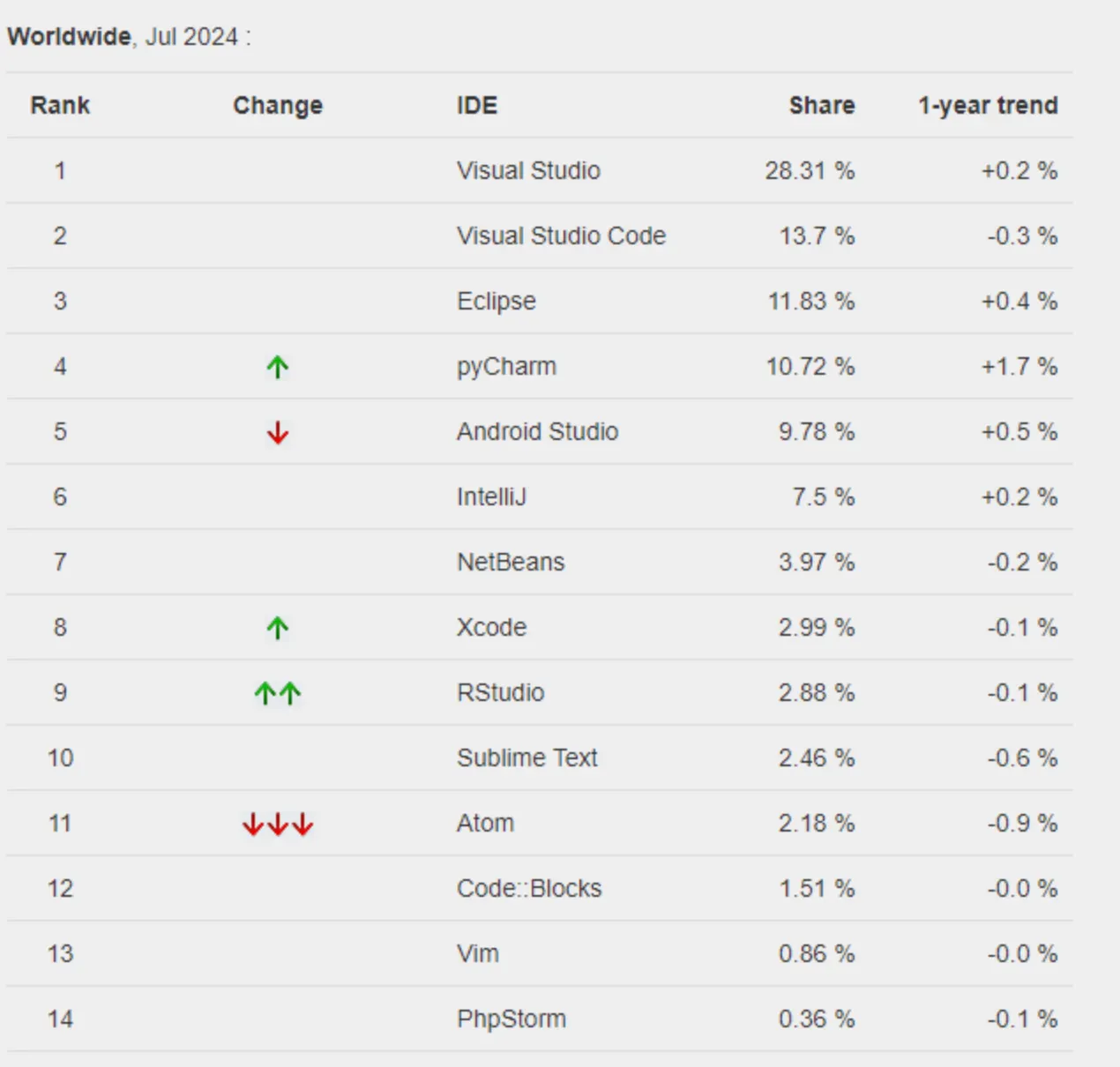
2024 IDE 사용률 통계로 살펴보는 현황
•
개발 언어에 따라 특화된 툴이 있기도 하며, 최근에는 전반적으로 기능을 제공하기 위한 플러그인도 개발되며 점점 개성으로 변하고 있음
•
그 경계가 흐릿한 만큼 유료인 것과 무료인 것에서 사용률에 큰 차이가 있을 수 있음

[TypeScript] 1. 개발 환경 구축과 VCS
1. TypeScript란?

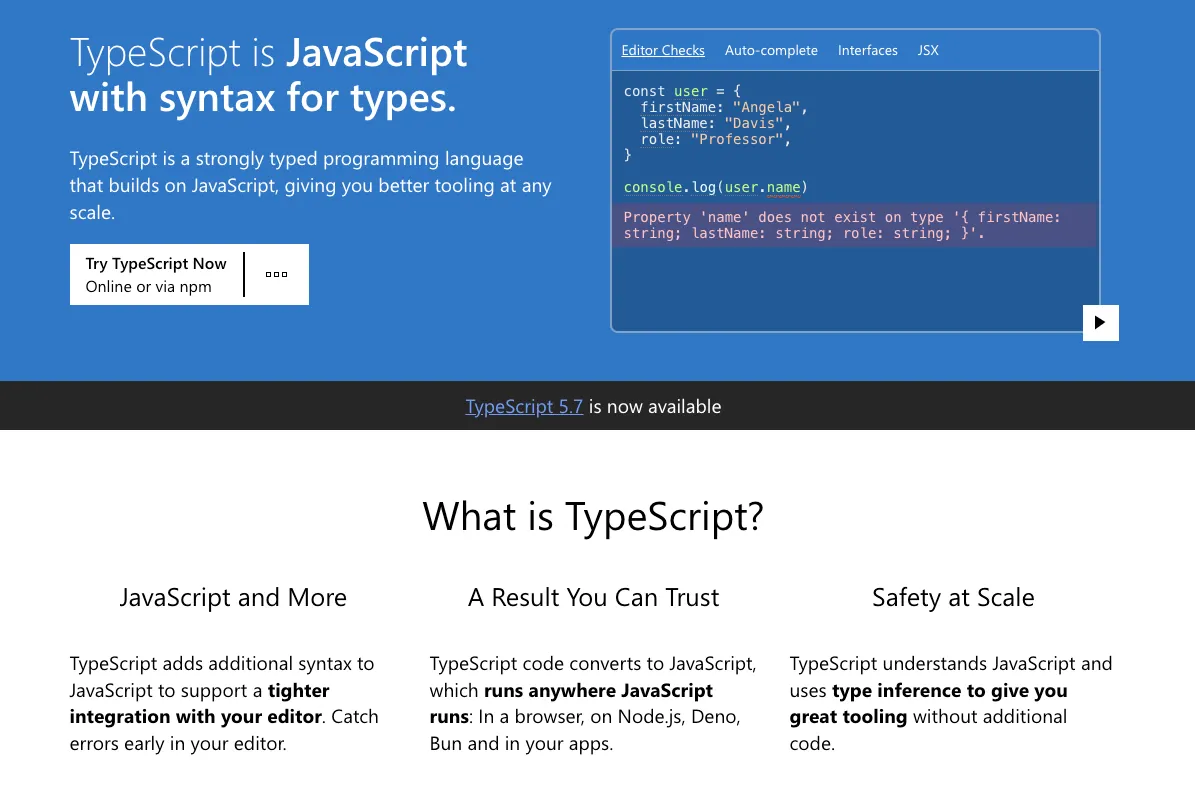
TypeScript?
•
TypeScript는 타입 구문이 있는 JavaScript이다.
◦
TypeScript는 JavaScript 기반의 강력한 타입 프로그래밍 언어로 어떤 규모에서도 더 나은 도구를 제공한다.
정적 VS 동적 프로그래밍 언어(토글)
•
TypeScript는 JavaScript의 상위 집합이다.
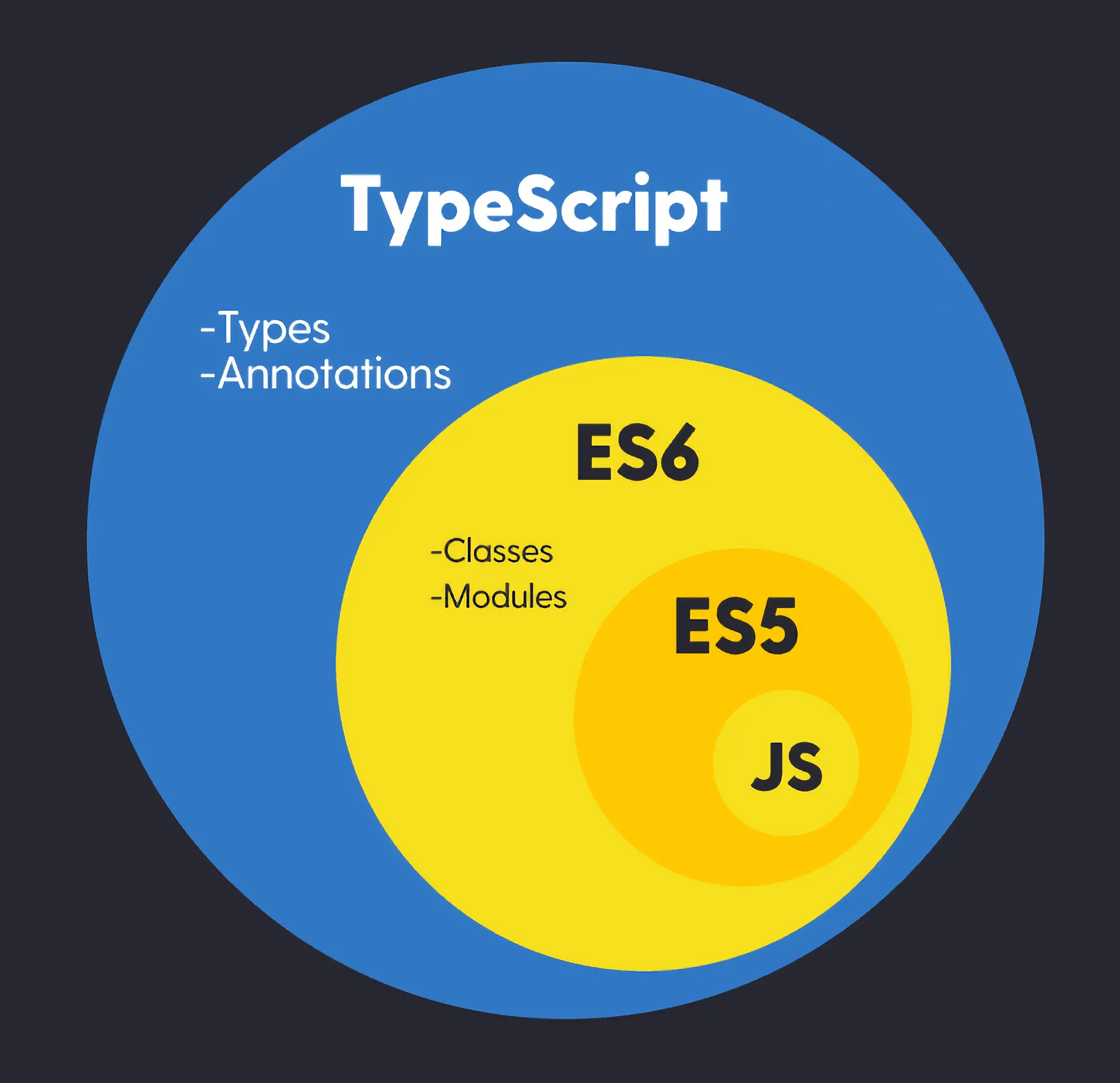
ES(ECMAScript)6 이후, 모던 자바스크립트라고 부름
◦
TypeScript는 추가적인 구문을 JavaScript에 에디터와 긴밀히 연결 되는 기능을 제공 함. 에디터에서 일찍 오류를 잡을 수 있음
▪
개발자는 개발 단계에서 코드 작성 중 실시간으로 오류를 발견할 수 있음
◦
TypeScript 코드는 JavaScript로 변환되며, JavaScript가 실행되는 모든 곳 (브라우저, Node.js, Deno, Bun 및 앱)에서 실행 됨
▪
TypeScript는 컴파일 과정에서 원래 코드의 의미를 보존하면서, 타입 정보는 제거하고 순수한 JavaScript 코드로 변환 됨
▪
기존 JavaScript 프로젝트에 쉽게 통합할 수 있는 장점
◦
TypeScript는 JavaScript를 이해하고 타입 추론을 사용하여 추가 코드 없이 훌륭한 도구를 제공
▪
TypeScript는 JavaScript의 문법과 동작 방식을 완전히 이해하고 있음
▪
JavaScript로 작성된 코드가 TypeScript에서도 유효하다는 것
•
TypeScript는 JavaScript의 유연성, 확장성을 유지하면서도 정적 타입 시스템의 이점을 제공하여, 동적+정적 타입 언어의 특성을 모두 이해하는 더 나은 개발 경험을 제공

[TypeScript] 2. TypeScript 소개
1. TypeScript 시작하기

새로운 프로젝트 (metaverse/greeter)
•
node 프로젝트 생성
npm init -y
Shell
복사
•
프로젝트에 타입스크립트 모듈 설치
npm i typescript
Shell
복사
•
src 폴더 생성 및 greeter.ts 파일 생성

function greeter(person: string) {
return "Hello, " + person;
}
let user = "Fred User";
document.body.textContent = greeter(user);
TypeScript
복사
•
.ts TypeScript 파일만 가지고는 프로그램을 실행시킬 수 없다.
node greeter.ts
Shell
복사
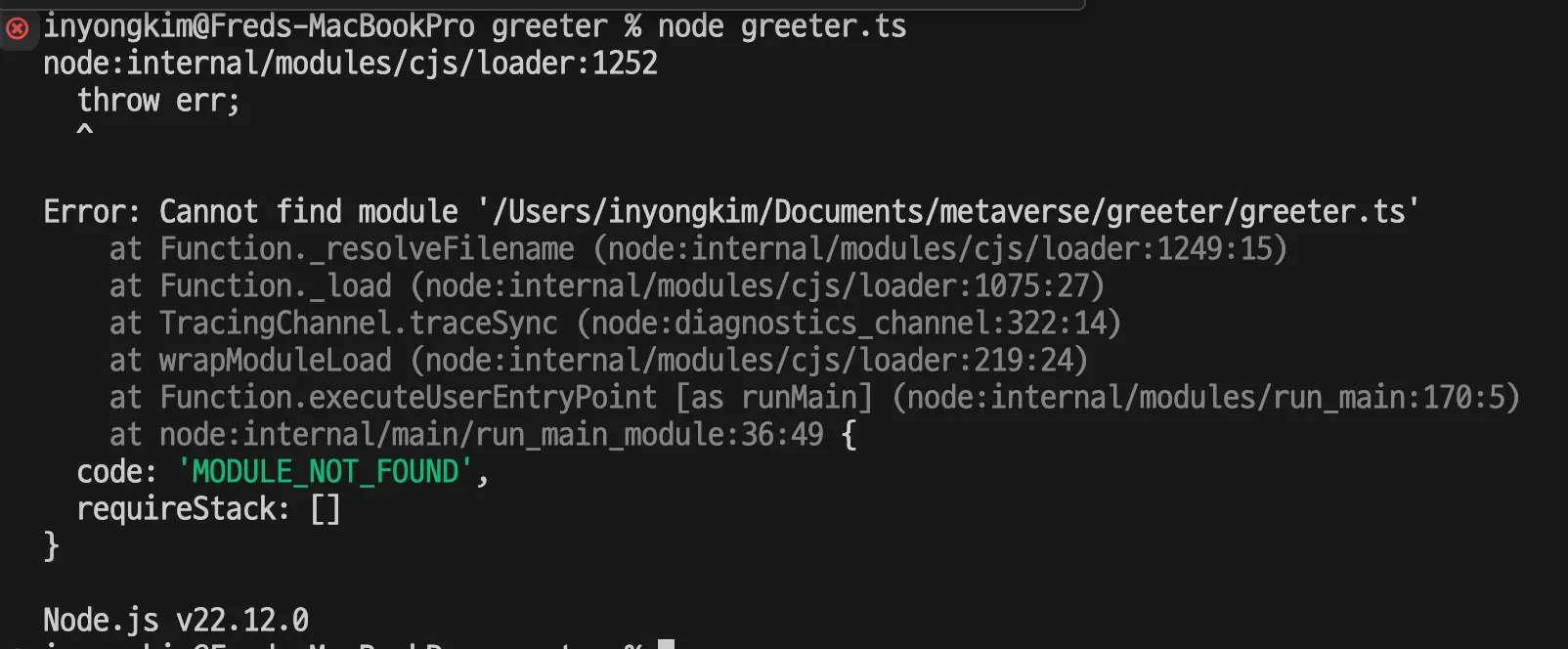

[TypeScript] 3. TypeScript 살펴보기
1. TypeScript의 기본 사항

새로운 폴더 (metaverse/greeter/src/basic)
•
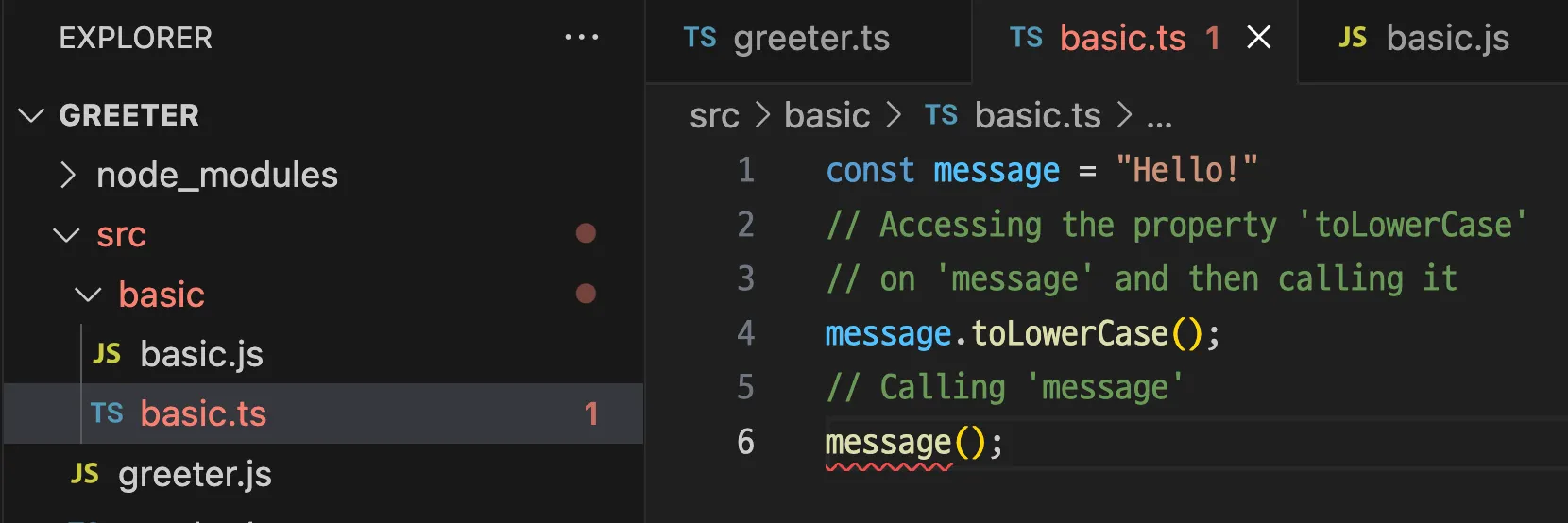
basic.ts 생성
const message = "Hello!"
// Accessing the property 'toLowerCase'
// on 'message' and then calling it
message.toLowerCase();
// Calling 'message'
message();
TypeScript
복사
•
message는 string 타입의 변수이다.
•
.toLowerCase(); 를 통해 소문자로 변환 될 것이다.
•
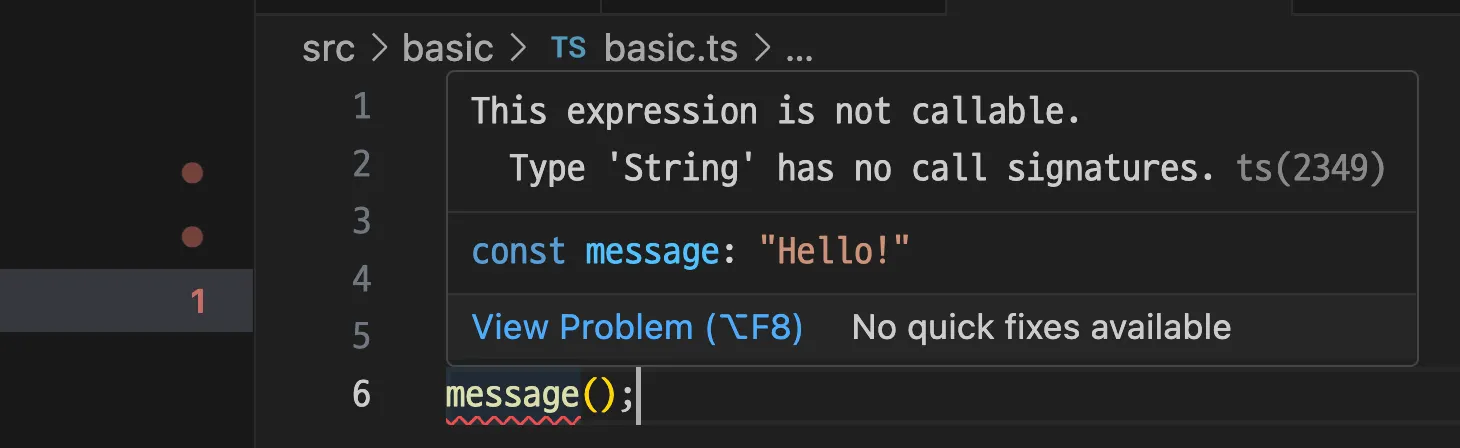
message(); 를 통해 변수를 호출 할 수 있는가?
•
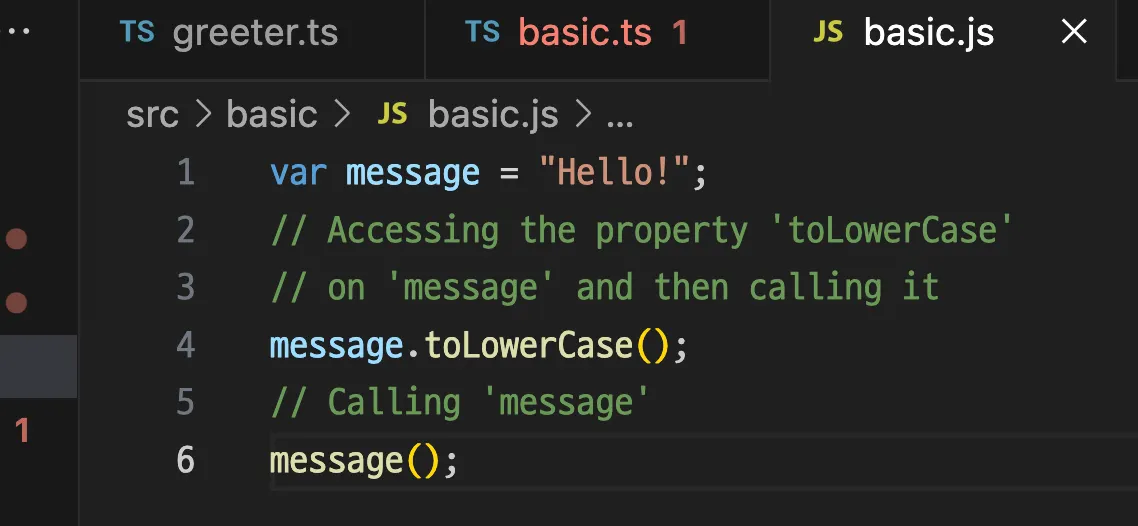
컴파일하여 .js 파일을 생성 후 실행
npx tsc basic.ts
Shell
복사
node basic.js
Shell
복사
•
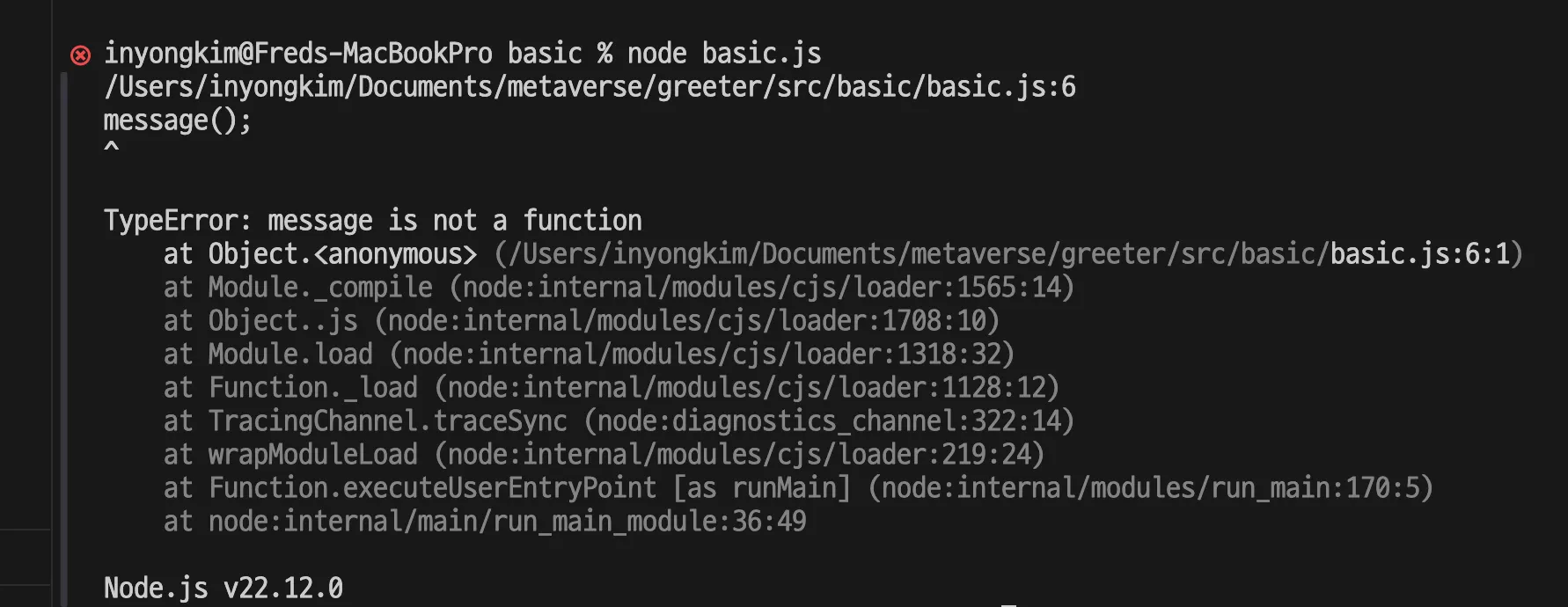
message는 함수가 아니기 때문에 저런 방식으로 호출 할 수 없다.
◦
이런 실수를 미리 방지하는 것이 중요하다.
•
TypeError가 의미하는 것
◦
basic.js의 오류가 없는 모습, 결국 실행해야 오류가 나타나는 모습은
▪
JavaScript 런타임은 코드가 실행 될 때 자신이 무엇을 해야 할 지 결정하기 위해 값의 타입 뿐만 아니라 어떤 동작, 능력, 필드를 가지고 있는지 확인함
◦
basic.ts처럼 타입스크립트에선 이미 오류 상태를 파악 할 수 있음
•
결론적으로, TypeScript는 변수의 타입뿐만 아니라, 해당 변수의 메서드와 속성에 대한 정보도 파악하여, 코드 작성 시점에 오류를 미리 감지
◦
이는 개발자가 더 안전하고 오류 없는 코드를 작성하는 데 도움을 줌
2. TypeScript 다양한 서포트

[TypeScript] 4. TypeScript 의 기본 기능
1. 원시 타입

새로운 폴더 (metaverse/greeter/src/types)
•
types.ts 생성
//The primitives
const str = "Hello"; // string
const num = 10; // number
const bool = true; // boolean
console.log(str.length); // 5
console.log(str.toUpperCase()); // HELLO
TypeScript
복사
◦
string : 문자열 / “ “ 따옴표로 감싸서 표현
◦
number : 숫자 / 숫자를 표현, Java와 달리 다양한 숫자 타입(예: int, float, double)이 없음
◦
boolean : 논리 / true or false 표현
•
소문자임을 기억하도록 한다. Java 등에서는 대문자로 표기하지만 JavaScript에서의 대문자 String, Number, Boolean은 wrapper 객체로 변환하는 기능이 있는데 사용이 권장되지 않으며 많이 사용되지 않으므로 주의한다.
// ETC : Wrapper object
const wrapperStr = new String(num);
console.log(wrapperStr.length); // 2
console.log(wrapperStr.toUpperCase()); // HELLO
const wrapperNum = new Number("hello");
console.log(wrapperNum.toFixed(2));
const boolNum = 1;
const wrapperBool = new Boolean(boolNum);
console.log(wrapperBool)
TypeScript
복사

[TypeScript] 5. TypeScript의 타입 - 1편
1. Union

유니온 타입 (metaverse/greeter/src/types)
•
types.ts
// Union
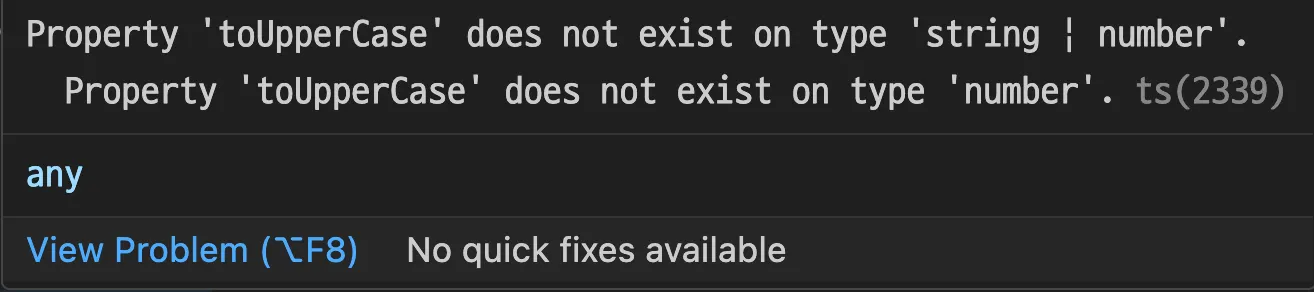
function printId(id: number | string) {
console.log(id.toUpperCase());
// if (typeof id === "string") {
// // In this branch, id is of type 'string'
// console.log(id.toUpperCase());
// } else {
// // Here, id is of type 'number'
// console.log(id);
// }
}
TypeScript
복사
◦
id라는 변수는 number 또는(or ⇒ |) string 타입을 가질 수 있음을 명시
◦
해당 함수에 전달되는 파라미터 id는 숫자나 문자열 타입 일 수 있다는 의미
◦
→ 하지만 함수 실행부에서 각 타입일 때에 대한 후속 처리도 필요하다는 의미
▪
각 타입일 경우에 대해서 실행부를 좁히는 것을 Narrowing 이라 하며 주석 부분과 같이 상황별 대처를 조건문으로 처리해주는 등이 필요
•
하지만, 이런 기능이 있더라도 이런 코드가 좋은 코드인지 생각해볼 필요가 있음
◦
함수(메서드)는 역할에 맞는 한가지의 일만 하도록 구성해야 한다. by CleanCode
▪
모듈은 복잡도, 결합도를 낮춰야 하며, 응집도를 높여야 한다.
▪
→ 재사용성을 증가 시키며 이는 곧 유지보수성을 증가 시킨다.
◦
실행부에서 분기하는 것 보다, 거의 동일한 코드가 중복되더라도 정확한 메서드를 분리하는 것이 옳은 판단 일 수 있다.
▪
개발자는 이런 문제를 발견하고 이런 부분에서 판단을 늘려나가는 능력을 갖추어야 한다.
▪
GPT의 사용? → 관리, 감찰 할 수 있는 눈을 길러야 함

[TypeScript] 6. TypeScript의 타입 - 2편
1. Object
•
클래스(Class)를 다루기 위해서 객체(Object)에서부터 연관성을 이어나가도록 설명하고자 함

새로운 폴더(metaverse/greeter/src/class)
•
object.ts
•
타입 관련 연습을 통해서도 몇번 객체에 대해서 나타나기도하고 Java등 다른 언어로부터 익숙 할 수 있지만 다시 한번 복습하는 생각으로 진입
// Vanilia JS(PURE) : Object only -> Prototype-based programming
// object
let robot = { // Members
// Property(속성)
name: "R2-D2",
model: "AstroMech",
status: "Active",
// Method(행동)
performTask: function (task: string) {
console.log(`${this.name} is performing ${task}.`);
},
}
// usage with "."" dot operator
console.log(robot.name); // Accessing property
robot.performTask("Getting ready to move") // Calling method
TypeScript
복사
◦
순수 JavaScript에서는 Object만 있으며 이것을 프로토타입 베이스 프로그래밍이라 함
▪
객체는 속성과 메서드라는 멤버를 가지고 있음
•
속성 : 객체의 속성으로 객체의 특징
•
메서드 : 객체의 행동 또는 역할, 객체의 함수는 메서드로 불리움
▪
객체의 멤버에 접근(사용)하기 위해서는 . 도트 연산자를 통해 객체를 사용하게 됨

[TypeScript] 7. TypeScript의 Object/Class
1. Generics

새로운 폴더(metaverse/greeter/src/generics)
•
generics.ts
•
identity() 라는 함수가 다음처럼 구성되어 있다.
function identity(arg: number): number {
return arg;
}
TypeScript
복사
◦
숫자 타입의 파라미터 arg 변수를 입력받아, 숫자 타입의 arg 변수를 반환
◦
이런 함수는 왜있는가?
▪
CLI에서 echo command에서 자주 볼 수 있음
▪
입력된 값을 화면에 출력하는데 사용 됨
•
사용자가 입력한 데이터가 예상한 형식인지 확인하는 타입 검증의 목적
•
입력값을 다른 함수에 전달하거나, 조건문에서 사용하여 프로그램의 흐름을 제어하는 연산의 기초로 활용
•
사용자에게 입력한 값을 다시 보여줌으로써, 입력이 올바르게 처리되었음을 확인하기 위한 기초
•
만약, 다른 타입도 받을 수 있도록 하려면 어떻게 구성해야 하는가?
function identity(arg: any): any {
return arg;
}
TypeScript
복사
◦
단순히, 배운 것 처럼 any 타입을 이용 할 수도 있다.
◦
하지만 이것은 정확한 타입 검증의 목적을 달성 하기 어려울 수 있음
▪
number 를 입력했는데 어떠한 요인에 의해서라도 변질된다면 string이 나와도 타입이 변한것을 오류로 알 수 없음
•
그럼 모든 타입 마다 이것을 작성해야 하는가?
◦
이것 또한 함수의 이름이 중복되어 허용되지 않는다.

•
그럼 중복을 피해서 만들었다고 가정하자.
function identityNum(arg: number): number {
return arg;
}
function identityStr(arg: string): string {
return arg;
}
function identityBool(arg: boolean): boolean {
return arg;
}
//...
function identityObj1(arg: obj1): obj1 {
return arg;
}
function identityObj2(arg: obj2): obj2 {
return arg;
}
interface obj1 {
//...
}
interface obj2 {
//...
}
//...
TypeScript
복사
◦
하지만 타입은 기본형 타입만 있지 않다. 객체도 타입이 될 수 있고 따라서 수없이 많은 함수를 생성해야 하게 될 것이다.
•
이런 비효율적인 상황을 대처하기 위한 것이 Generics이다.
◦
< > 안에 작성된 키워드가 해당 함수에 동일한 표현들을 동적으로 통일시킨다는 것을 나타냄
◦
통일 될 최초 타입은 키워드가 작성된 Parameter(매개변수)의 타입이 기준이 되며 해당 블록의 키워드가 포함 된 타입들은 모두 이를 따르게 됨
// Use Generics
function identity<Type>(arg: Type): Type {
return arg;
}
TypeScript
복사
◦
Type이란 키워드 대신 T라는 키워드로 대체하여 사용하는 경우가 많음
// Use Generics
function identity<T>(arg: T): T {
return arg;
}
TypeScript
복사
◦
참고 : 여기 표현된 Type 또는 T(or U or V …) 는 실제 있는 자료형(타입) 이 아니다. 자유롭게 지정 할 수 있어 타입 별칭(Type Alias)과 혼동 될 수 있지만 다른 기능
▪
관례적으로 T를, 매개 변수가 2개 이상을 제너릭으로 표현해야 하는 경우엔 이후로는 U, V, W 등을 자주 사용한다.
function identity<T, U>(arg1: T, arg2: U): [T, U] {
return [arg1, arg2];
}
const result = identity(20, "Hello"); // result는 [number, string] 타입
TypeScript
복사
◦
정확히 구분 되는지 테스트
function isNumber(value: any) {
return typeof value === 'number' && !isNaN(value);
}
function isString(value: any) {
return typeof value === 'string';
}
// isArray는 Array의 내장 함수 사용
// 간단 테스트
// given
const testValue1: number = 20;
const testValue2: string = "Hi";
const testValue3: number[] = [1, 20];
// when 1
const numberIdentity = identity(testValue1); // number 타입
// then 1
console.log(`Input type is : ${typeof testValue1}`);
console.log(`Output type is : ${typeof numberIdentity}`);
console.log(`Is number: ${isNumber(numberIdentity)}`); // true
// when 2
const stringIdentity = identity(testValue2); // string 타입
// then 2
console.log(`Input type is : ${typeof testValue2}`);
console.log(`Output type is : ${typeof stringIdentity}`);
console.log(`Is string: ${isString(stringIdentity)}`); // true
// when 3
const arrayIdentity = identity(testValue3); // number[] 타입
// then 3
console.log(`Input type is : ${typeof testValue3}`);
console.log(`Output type is : ${typeof arrayIdentity}`);
console.log(`Is array: ${Array.isArray(arrayIdentity)}`) // true
TypeScript
복사
◦
Generics를 사용한 identity() 함수가 예상대로 작동하는지 확인해보자.
▪
테스트코드 작성의 Given-When-Then 패턴
▪
준비-실행-검증의 단계로 테스트의 흐름이 명확하고, 각 단계에서 어떤 작업이 이루어지는지 쉽게 이해하기 위한 표현 기법
•
Given: 테스트에 필요한 초기 데이터를 설정
•
When: 테스트를 실행하는 부분으로, identity 함수를 호출
•
Then: 각 입력값에 대한 결과를 검증하고 출력
•
제너릭을 실제로 구현하고, 사용하기 어려울 수도 있지만, 알고 있어야 하는 이유

◦
Array와 같은 내장 라이브러리를 살펴보자.
◦
우리가 사용하는 많은 함수, 메서드, 라이브러리 등은 이처럼 구현되어 있기 때문에 이는 다양한 데이터 타입을 쉽게 사용 할 수 있도록 구현되어 있다.
◦
필요에 따른 튜닝, 검토 등을 위해 내부 구조를 살펴보게 될 때 이해 할 수 있어야 한다.

[TypeScript] 8. TypeScript의 Generics
1. 프로그래밍 배경에서의 모듈
프로그래밍 전반 관점의 모듈
•
모듈이란 프로그램을 구성하는 시스템을 기능 단위로 독립적인 부분으로 분리한 것
•
단순히 규모가 큰 것을 작게 여러 개로 나눈 조각이 아니라, 하나 이상의 논리적인 기능을 수행하기 위한 명령어들의 집합
•
모듈은 독립적인 프로그램 그 자체일 수도 있고 함수나 메서드일 수도 있음
•
모듈이 되려면 다른 것들과 구분될 수 있는 독립적인 기능을 가져야 하고 유일한 이름을 사용해야 한다.
•
다른 프로그램이나 또 다른 모듈에서 호출하여 사용할 수도 있어야 한다. 또, 모듈 자체로서 재사용될 수 있고 독립적으로 컴파일이 가능해야 한다는 중요한 특징을 포함해야 한다.
•
모듈은 다양한 형태로 존재할 수 있는데 용도가 비슷한 함수나 추상화된 자료, 객체(Object), 메서드(Method)등이 이에 해당한다.
•
무언가 독립적인, 재사용가능한, 다른부분에도 사용되는 일종의 부품과 같은 개념으로 기억
•
이런 기능적인 분리를 통해서 다른 프로그램을 개발할 때에도 유지보수와 코드 재사용성을 높여 소프트웨어를 설계하는 기법을 모듈화(Modularization)라고 함
독립적인 모듈이 가져야 할 특성
•
모듈은 응집도가 높아야 하며, 결합도와 의존도는 낮아야 한다.
◦
응집도 (Cohesion)
▪
정의: 모듈 내의 구성 요소들이 얼마나 밀접하게 관련되어 있는지를 나타내는 척도
▪
특징:
•
높은 응집도: 모듈이 하나의 특정 기능을 수행하고, 그 기능과 관련된 모든 요소가 모듈 내에 포함되어 있을 때.
◦
장점: 높은 응집도를 가진 모듈은 가독성과 유지보수성이 높아지며, 코드의 가독성이 높아짐
•
낮은 응집도: 여러 가지 기능이 혼합되어 있거나, 서로 관련 없는 작업들이 함께 포함된 경우.
◦
2. 결합도 (Coupling)
▪
정의: 모듈 간의 의존성을 나타내는 척도입니다. 한 모듈이 다른 모듈에 얼마나 의존하고 있는지를 나타냄
▪
특징:
•
낮은 결합도: 모듈이 서로 독립적으로 작동할 수 있고, 한 모듈의 변경이 다른 모듈에 영향을 미치지 않을 때.
◦
장점: 낮은 결합도를 가진 시스템은 유연성과 재사용성이 높아지며, 유지보수와 확장성이 높아짐
•
높은 결합도: 모듈 간의 의존성이 강할 경우, 한 모듈의 변경이 다른 모듈에 영향을 미치게 됨
◦
3. 의존도 (Dependency)
▪
정의: 한 모듈이 다른 모듈이나 컴포넌트에 의존하는 정도를 나타내는 척도입니다. 의존도는 모듈 간의 관계를 설명하며, 특정 모듈이 다른 모듈의 기능이나 데이터를 필요로 할 때 발생합니다.
▪
특징:
•
높은 의존도: 한 모듈이 다른 모듈에 강하게 의존할 경우, 변경 시 영향을 받을 가능성이 높음
•
낮은 의존도: 모듈이 다른 모듈에 대한 의존성이 적거나 없는 경우, 변경 시 영향이 적음
◦
장점: 낮은 의존도를 가진 시스템은 모듈 간의 독립성을 높여, 유지보수와 테스트가 용이해짐

[TypeScript] 9. TypeScript의 Modules