NestJS, TypeORM 이해하기
Table of Content

1. 현재까지 진행된 상태에서 짚어 볼 수 있는 문제점
1.1 컨벤션(Convention) 이란?

명명규칙을 기획 초기에 수립하는 것의 중요성을 확인하고자 한다.
•
컨벤션(Convention)은 코드 작성, 명명 규칙, 폴더 구조, 파일명 등 프로젝트 내에서 개발자들이 공통적으로 따르는 규칙이나 가이드라인을 의미
•
이런 규칙을 수립하는 것을 컨벤션을 수립하다 라는 표현을 쓰기도 한다.
•
컨벤션은 문서화하여 프로젝트의 모든 개발자가 참고할 수 있도록 하는 것이 좋음, 보통은 프로젝트의 README.md 파일이나 프로젝트 SA페이지 또는 팀 블로그 등 페이지로 정리
•
실전 문서화 예시
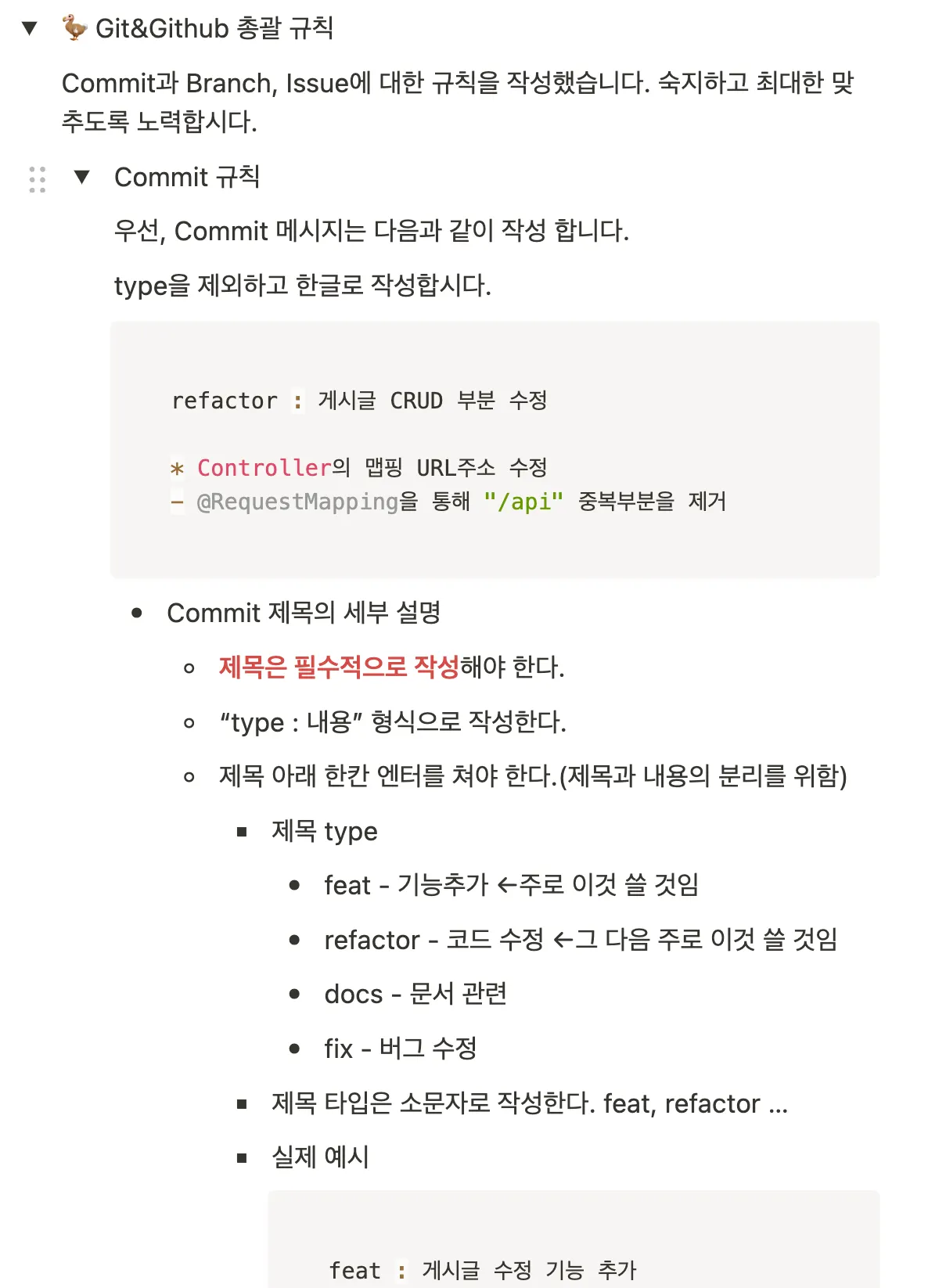
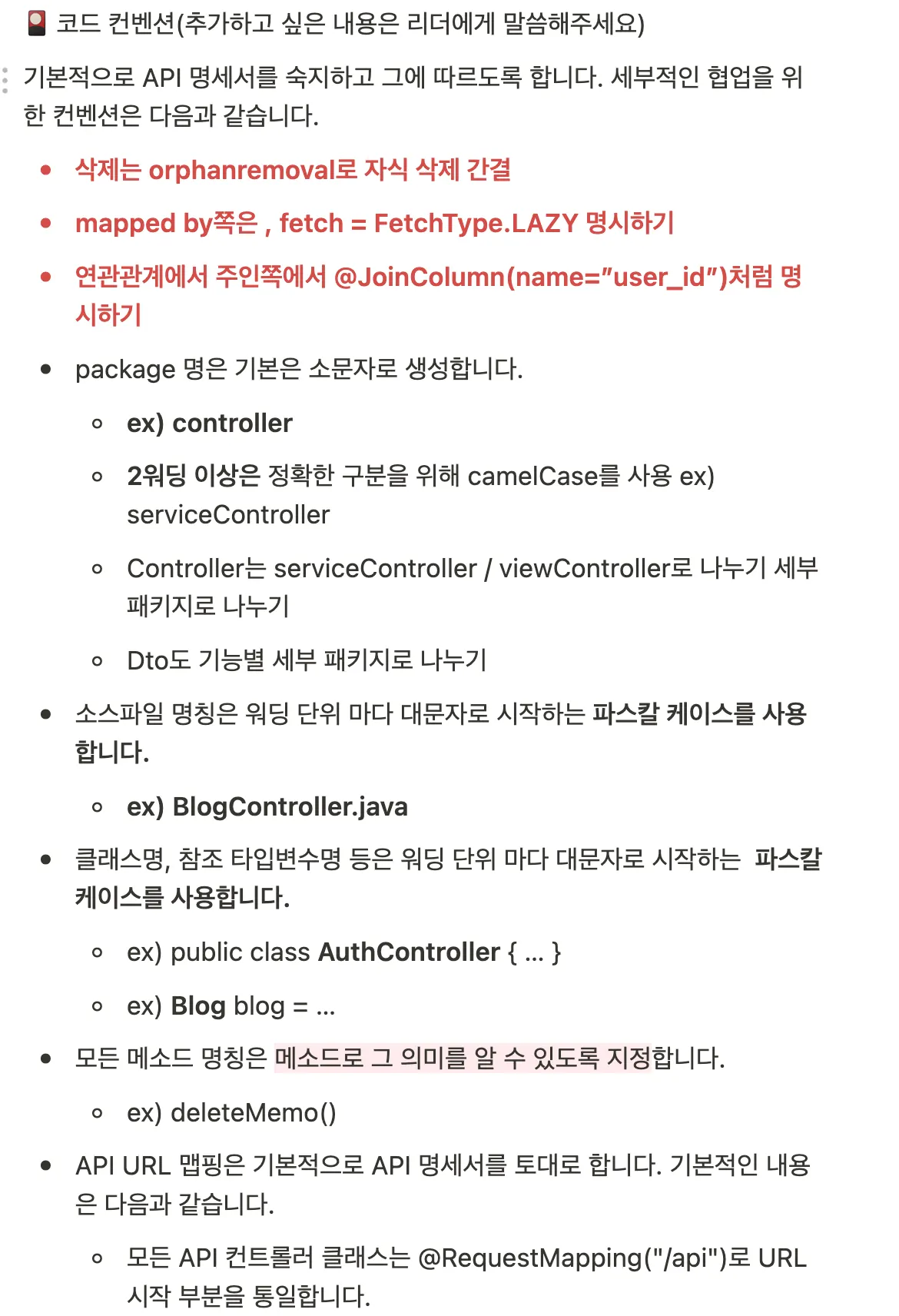

컨벤션의 목적
•
일관성 유지: 코드베이스 전체에서 일관된 스타일과 구조를 유지
•
가독성 향상: 명확한 규칙에 따라 작성된 코드는 이해하기 쉽고, 다른 개발자들이 코드를 확인하는 유지보수성 향상
•
협업 효율성 증가: 팀원 간의 코드 스타일이 통일되면 협업 시 불필요한 충돌이 줄어들고, 코드 리뷰의 편의성 향상
•
버그 예방: 일관된 규칙을 따르면 실수나 버그를 쉽게 찾아내고 빠른 픽스가 가능
컨벤션의 종류
•
코딩 스타일 컨벤션:
◦
들여쓰기, 공백, 줄바꿈, 중괄호 배치 등 코드 스타일에 대한 규칙
◦
예: 2-space 들여쓰기 vs 4-space 들여쓰기, 공백 한 줄 삽입 등
•
명명 규칙 컨벤션:
◦
변수, 함수, 클래스, 파일명 등을 어떻게 명명할지에 대한 규칙
◦
예: camelCase vs snake_case, PascalCase, Kebab-Case 사용 등
•
폴더 구조 컨벤션:
◦
프로젝트의 폴더 구조와 파일 배치에 대한 규칙
◦
예: 기능별로 폴더를 나누기, 특정 폴더에 특정 타입의 파일 배치 등
•
프레임워크 컨벤션:
◦
특정 프레임워크에서 권장하는 규칙
◦
예: NestJS에서 컨트롤러 파일은 .controller.ts로, 서비스 파일은 .service.ts로 명명하기 등
•
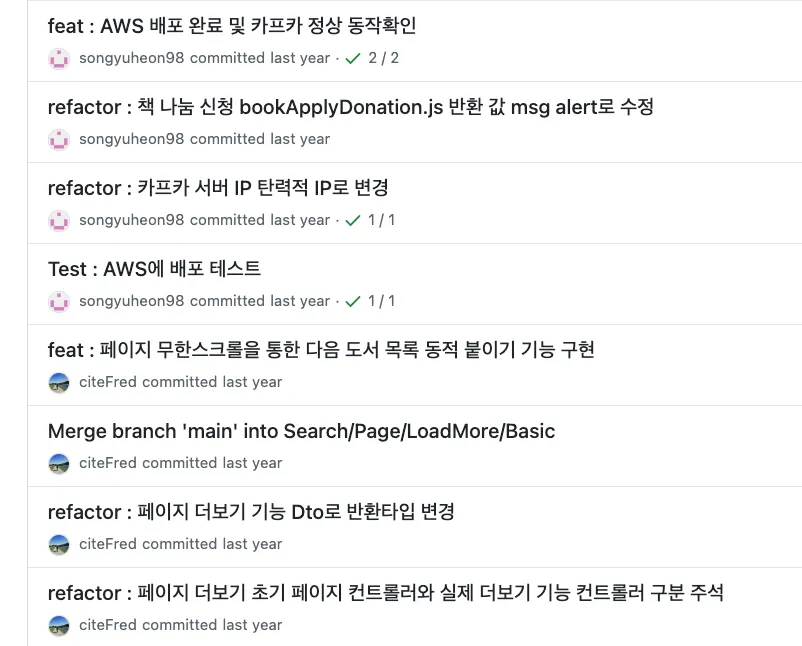
커밋 컨벤션 및 PR 컨벤션
◦
일관된 방식으로 커밋 메시지, PR을 작성하고 관리하기 위한 규칙

◦
예: 커밋 컨벤션 (git config 를 통한 commit_messege_template.md 설정)
# <타입> : <제목> 형식으로 작성하세요
################
# 타입 설정하기
## feature : 새로운 기능 추가
## fix : 버그 수정
## docs : 문서 수정
## test : 테스트 코드 추가
## refactor : 코드 리팩토링
## style : 코드 의미에 영향을 주지 않는 변경사항
## chore : 빌드 부분 혹은 패키지 매니저 수정사항
# 제목 설정하기
## 제목 작성 후 공백 한줄을 포함해야, 제목과 본문이 구별됨
## 제목 첫 글자는 대문자로 작성, 마침표를 사용하지 않음
## 제목은 명령문으로 사용, 과거형을 사용하지 않음
## 제목은 50글자로 제한
################
##### 제목을 아랫줄에 작성하세요 #####
################
# 본문 설정
## 본문 작성 후 공백 한줄을 포함해야, 본문과 Resolves가 구별됨
## 본문의 각 행은 72글자로 제한
## 본문은 "왜"와 "무엇을"위주로 작성
## 본문은 행으로 구분되어야 함
## 본문의 내용은 *으로 시작함
################
##### 본문(추가 설명)을 아랫줄에 작성하세요 #####
################
# Resolves 설정
## Resolves 작성 후 공백 한줄을 포함해야, Resolves와 See also가 구별됨
## Resolves의 내용도 *으로 시작함
## 해결한 이슈는 닫을 수 있도록 함.
# 이슈 종료 방법
## '키워드 #이슈번호'
# issue 종료 키워드 (github)
## * close - 일반 개발 이슈
## * closes
## * closed
## * fix - 버그 fix 이슈
## * fixed
## * resolve - 문의 요청사항 이슈
## * resolves
## * resolved
################
##### Resolves를 작성하세요 (생략 가능) #####
################
# See also 설정
## 연관된 이슈의 경우 이슈 번호와 연관 이슈 내용을 입력
## See also의 내용도 *으로 시작함
################
##### See also를 작성하세요 (생략 가능) #####
################
# Remember me ~ Commit Message 규칙
## 1. 제목과 본문을 빈 행으로 구분한다.
## 2. 제목을 50글자 내로 제한
## 3. 제목 첫 글자는 대문자로 작성
## 4. 제목 끝에 마침표 넣지 않기
## 5. 제목은 명령문으로 사용하되, 과거형을 사용하지 않는다.
## 6. 본문의 각 행은 72글자 내로 제한
## 7. 어떻게 보다는 무엇과 왜를 설명
################
Markup
복사
◦
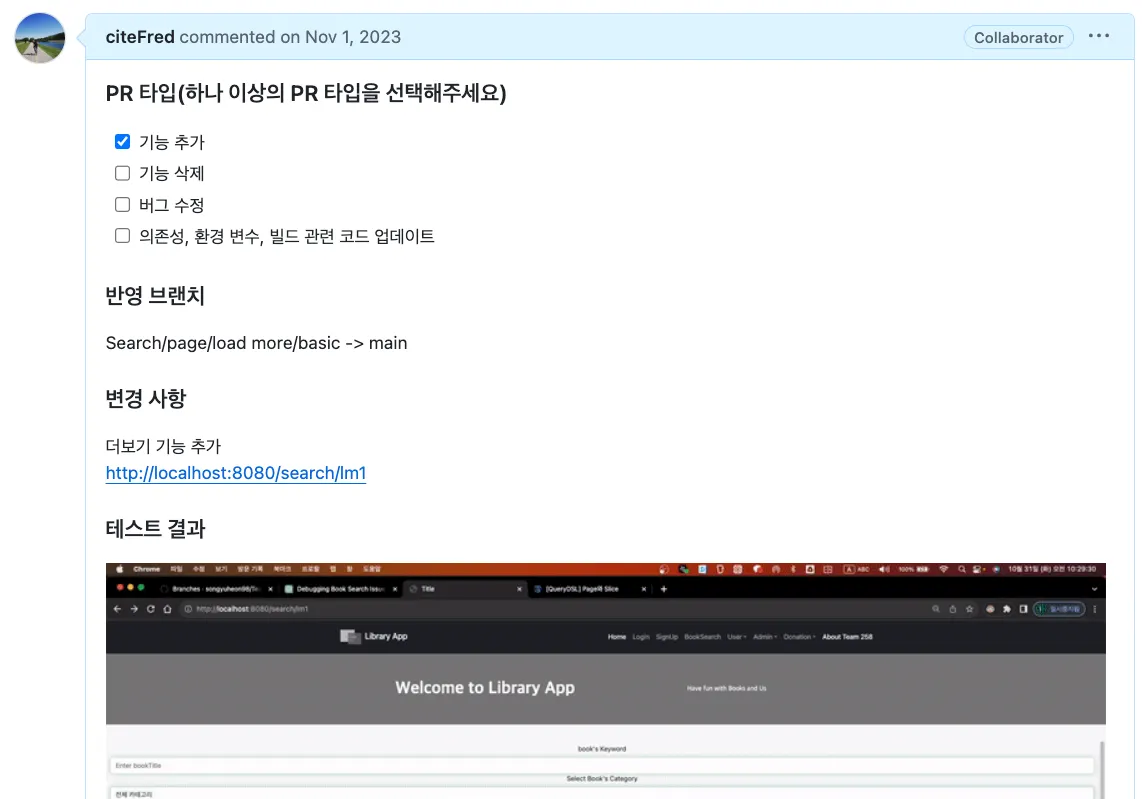
예: PR 컨벤션(.github PULL_REQUEST_TEMPLATE.md) 템플릿 예시
### PR 타입(하나 이상의 PR 타입을 선택해주세요)
- [X] 기능 추가
- [ ] 기능 삭제
- [ ] 버그 수정
- [ ] 의존성, 환경 변수, 빌드 관련 코드 업데이트
### 반영 브랜치
### 변경 사항
### 테스트 결과
Markup
복사
1.2 명명 규칙 오류 발견하기
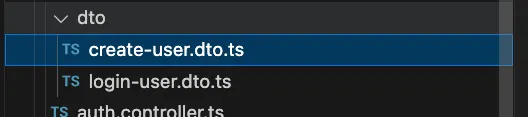
기존 DTO 명명 규칙 살펴보기
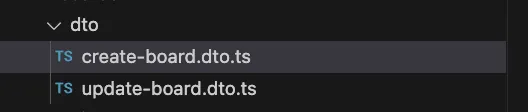
•
현재 존재하는 DTO 클래스들은 모두 Request관련 Dto들이다.
•
위 파일들의 명명 규칙은 내가 선호하는 방식이아닌 이유는 다음과 같다.
◦
DTO의 이름으로 기능을 표현하고 있지만 Response 관련 DTO 클래스들이 추가되면 혼동이 생길 수 있다.
◦
Request, Response 등 역할에 대해 직관적이지 않다.
새로운 명명 규칙 정책 적용
•
새롭게 명명 규칙을 정리했으며 다음과 같다.
•
Request관련 클래스명은 ~RequestDto , 파일 명은 ~-request.dto.ts
•
Response관련 클래스명은 ~ResponseDto , 파일명은 ~-response.dto.ts
•
파일명은 NestJS에서 일반적인 KeBab-case 사용( - 하이픈 구분)
◦
기존 DTO들부터 명칭을 변경해준다.
▪
파일명
•
create-user.dto.ts → sign-up-request.dto.ts
•
login-user.dto.ts → sign-in-request.dto.ts
•
create-article.dto.ts → create-article-request.dto.ts
•
update-article.dto.ts → update-article-request.dto.ts
▪
클래스명
•
CreateUserDto → SignUpRequestDto
•
LogInUserDto → SignInRequestDto
•
CreateArticleDto → CreateArticleRequestDto
•
UpdateArticleDto → UpdateArticleRequestDto
◦
기존 클래스를 사용하던 Controller, Service 계층에서도 위 명칭으로 수정해준다.
•
수정을 하면서 얼마나 많은 부분들이 수정되어야 하는지 볼 수 있다.
•
이만큼 처음의 명명규칙과 관련된 컨벤션(Convention) 정책을 수립하는 것의 중요성을 알 수 있다.
Board라는 것이 게시글인가? 에 대한 문제점
•
현재 DTO의 컨벤션을 맞추면서 기획 단계에서 애매한 것들, 수립하지 못한것들이 나타나고 있다.
근본적으로 Board를 게시글 엔터티, 리소스 명칭으로 사용하는 것 자체의 문제점이 있다.
•
게시글은 Post 또는 Article이 적당하다.
•
Board는 게시판 그 자체이다.
◦
실제로는 자유게시판, 공지게시판, 직원게시판 등 여러개가 생성 될 가능성이 있다
◦
이 경우 위 처럼 게시판을 구분하는 기능 확장 가능성이 높은 케이스이기 때문에 초기에 수정해야 이후 문제가 발생하지 않을 가능성이 높다.
•
Board로 관련되어있는 모든 키워드를 Article로 변경한다.
◦
엔터티 명칭까지 Board → Article로 변경 할 것이기 때문에 DB의 테이블 자체가 article로 변경 될 것이다.
◦
Post 를 사용하지 않는 이유는 POST Http method와 겹치기 때문에 충돌이 날 가능성이 있다.

현재 boards.controller.ts, board.entity와 같이 단수와 복수가 혼재되어 있는 상태이다.
•
기본적으로 단수로 표현하는 것이 가장 편리하고 가독성이 좋다.
•
여러 게시판을 다루는 경우에 Boards 처럼 복수를 사용하기는 하지만,
•
일부의 불규칙보다는 전체 통일성을 지키는 것이 가장 중요하다. BoardController 처럼 단수 또항 그 의미가 모호하지 않다.
◦
Board → Article로 바꾸는 과정에서 기존 Boards인 복수 부분들을 Articles로 통일
◦
하지만 메서드 명칭에서getAllArticles() 처럼 해당 기능이 여러 게시글을 가져오는 것이 명확한 것만 Articles처럼 복수형을 사용
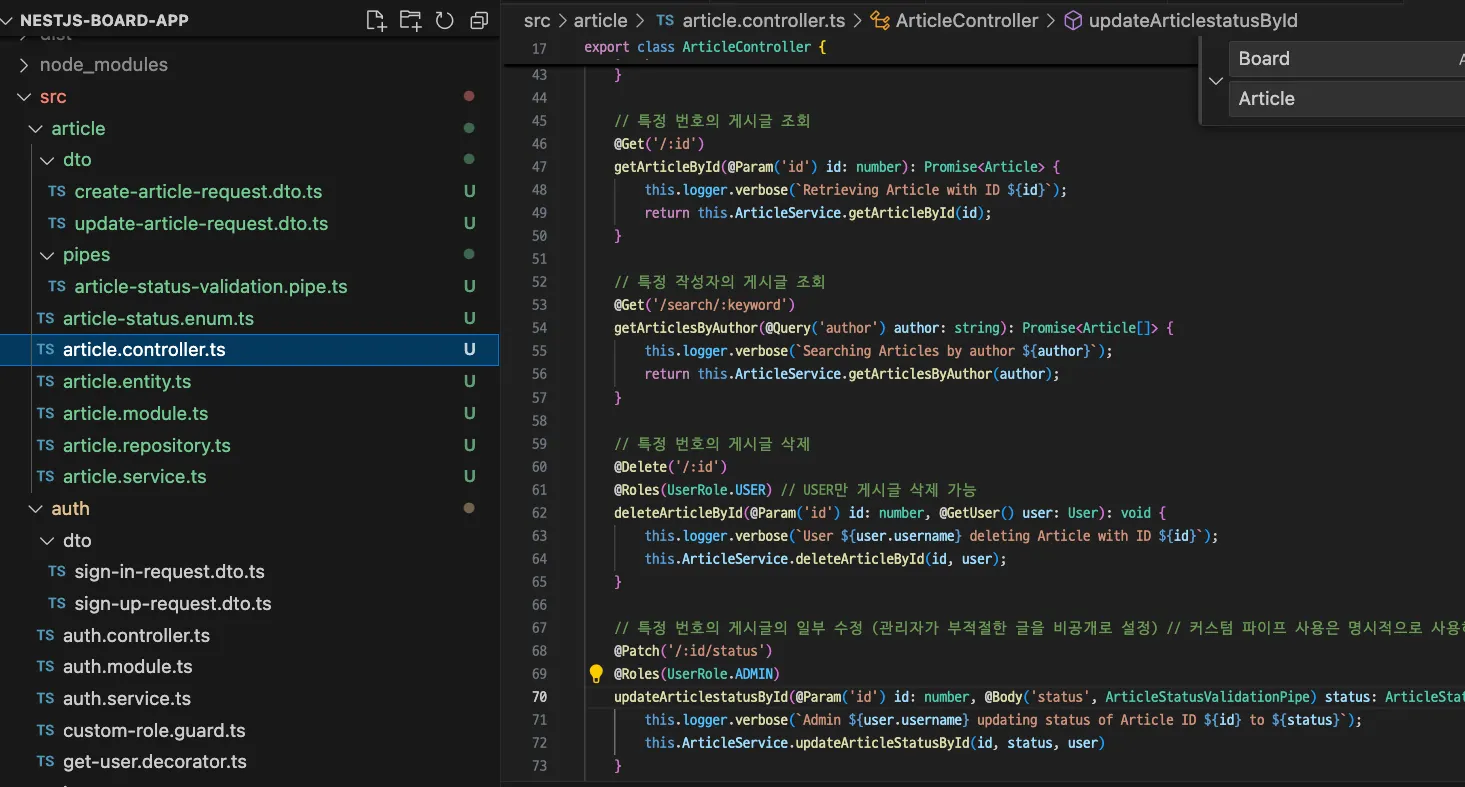
수만은 파일과 소스코드 내 명칭이 변경되었다. 가장 큰 변화는 테이블 자체가 변경되어 기존 데이터들은 소실된다는 점.

이제 기존 board 테이블이 아닌 article을 사용하게 되었다.
엔드포인트는 복수가 표준이다.
•
RESTful API에서는 컬렉션을 다룰 때 복수형을 사용하는 것이 표준
•
따라서 ‘api/articles’ 프리픽스는 맞는 표현이다.
@Controller('api/articles')
...
TypeScript
복사
•
POSTMAN을 통한 리팩토링 테스트
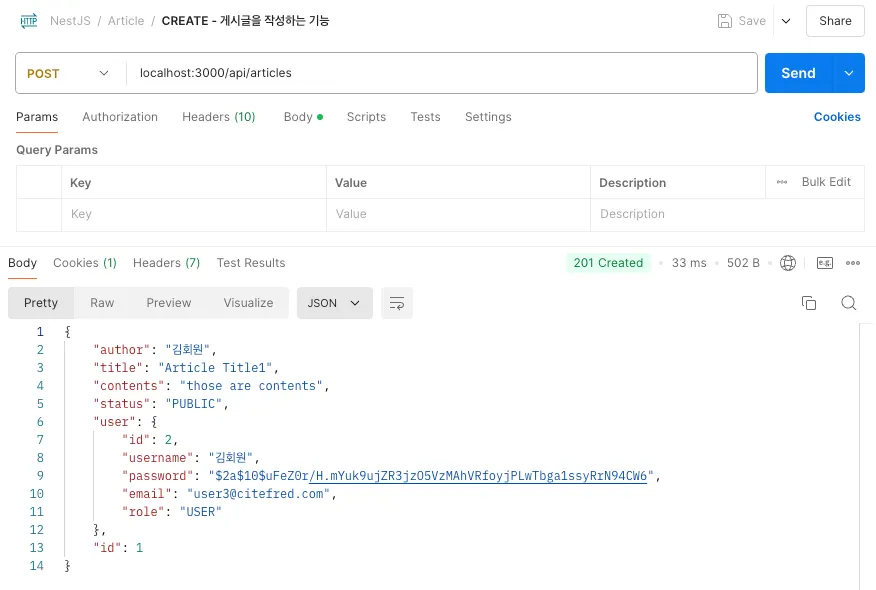
•
이만큼 초기 기획에서 명명규칙을 올바르게 결정해야 추후 서비스 운영단계에서 데이터베이스가 바뀌는 등 최악의 상황을 막을 수 있다.
•
개발자는 이런 오류, 확장 가능성을 고려한 설계변경을 개발단계에서 미리 발견하고 피보팅해야 한다.
•
단수와 복수의 문제는 현재까지도 개발자들 사이에서 명확하게 정해진 방법론이 없다.


◦
하지만 다양한 의견과 REST api의 첫 논문에서도 정확하게 규정하고 있지않기 때문에 관례적인 명명규칙이 정착 되고있다.
◦
다양한 사례에서 이런 공통점을 볼 수 있다.
▪
Entity는 단수형(테이블명은 단수)을 사용하는 의견
▪
URI(엔드포인트 리소스명)은 “localhost:3000/api/users” 처럼 복수형을 사용하는 의견
▪
src 소스폴더내의 각 리소스(컬렉션)은 복수를 사용하는 의견 src/users/…
◦
이런 다수의 의견들이 개발자들의 관례를 만들어나가고 공통적으로 사용되게 된다.
◦
결론적으로 이와 같이 규칙을 정하도록 했다.
▪
src/users/… : 리소스를 나타내는 컬렉션 폴더와 하위 소스코드는 복수를 선택
•
그 중 엔터티와 DTO는 단수를 선택
▪
/api/users : URI는 복수를 선택
▪
auth 모듈은 인증 관련 모든 기능을 관리하는 단일 모듈로 간주. 따라서, 모듈 이름은 단수형인 것이 적합
•
이와 같이 기능 단위의 모듈(ex: file, payment, config 등)은 단수형을 사용하도록 구성
1.3 Auth 리소스에 User가 혼재된 문제
Auth 폴더 안에 회원가입과 로그인을 위한 user.entity.ts 등 User관련 클래스들이 섞여있다.
•
사실 인증과 인가 / 회원 기능은 구분해야 한다.
•
그 중 회원가입은 종종 auth 기능에 포함되는 관례가 있다.
◦
Auth는 로그인 회원가입 비밀번호 변경 등이 포함되는 것이 일반적
◦
User는 사용자 프로필 관리, 역할 변경 등이 일반적
•
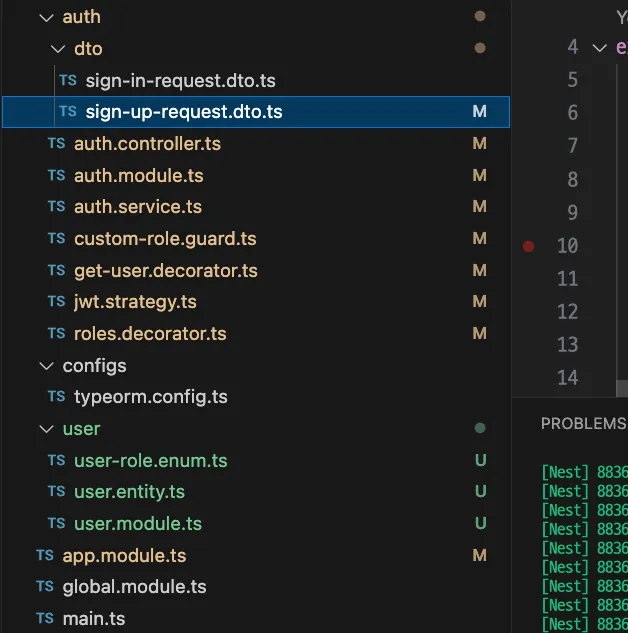
기능과 역할의 구분을 위하여 폴더를 별도로 구분하고, 주입을 통해서 사용하도록 하는 것이 올바르다고 판단되었다.
◦
user 폴더는 사용자와 관련된 모든 데이터, 필요한 파일들을 포함
▪
user.entity.ts
▪
user.module.ts
▪
user-role.enum.ts
◦
auth 폴더는 인증과 관련된 모든 파일들을 포함
▪
auth/dto/
•
sign-up-request.dto.ts
•
sign-in-request.dto.ts
▪
auth.controller.ts
▪
auth.module.ts
▪
auth.service.ts
▪
custom-role.guard.ts
▪
get-user.decorator.ts
▪
jwt.strategy.ts
▪
roles.decorator.ts
2. 엔터티 공통 부분 모듈화
현재 2개의 엔터티 말고도 앞으로 계속해서 기능이 추가될 때 마다 엔터티가 추가될 가능성이 있다.
•
모든 엔터티에서 공통적으로 다루어야 할 것들이 있다.
◦
id : 해당 엔터티의 기본키(PK) 역할이며 고유한 객체임을 구분 할 수 있는 필드
◦
createAt : 해당 데이터가 생성된 시간을 기록하기 위해 사용하는 필드
◦
updateAt : 해당 데이터가 수정된 시간을 기록하기 위해 사용하는 필드(또는 modifiedAt)
추상 클래스(Abstract Class)로 공통 부분을 모아두고 각 엔터티에서 상속 받기
•
id, createAt, updateAt을 CommonEntity라는 추상 클래스로 생성한다.
•
해당 파일은 src/common 이라는 폴더에 위치시켜 공용으로 사용되는 파일임을 인지
•
common.entity.ts
import { PrimaryGeneratedColumn, CreateDateColumn, UpdateDateColumn } from 'typeorm';
export abstract class CommonEntity {
@PrimaryGeneratedColumn()
id: number;
@CreateDateColumn({ type: 'timestamp' })
createdAt: Date;
@UpdateDateColumn({ type: 'timestamp' })
updatedAt: Date;
}
TypeScript
복사
•
article과 user 엔터티에서 중복되는 id 컬럼 부분을 제거해도 된다.
•
엔터티 클래스는 위 공통부분인 CommonEntity를 상속 받아야 한다. extends CommonEntity
◦
article.entity.ts
import { Column, Entity, ManyToOne } from "typeorm";
import { ArticleStatus } from "./article-status.enum";
import { User } from "src/user/entities/user.entity";
import { CommonEntity } from "src/common/entities/common.entity";
@Entity()
export class Article extends CommonEntity {
@Column()
author: string;
@Column()
title: string;
@Column()
contents: string;
@Column()
status: ArticleStatus
@ManyToOne(Type => User, user => user.articles, { eager: false })
user: User;
}
TypeScript
복사
◦
user.entity.ts
import { Column, Entity, OneToMany } from "typeorm";
import { UserRole } from "./user-role.enum";
import { Article } from "src/article/entities/article.entity";
import { CommonEntity } from "src/common/entities/common.entity";
@Entity()
export class User extends CommonEntity {
@Column()
username: string;
@Column()
password: string;
@Column({ unique: true })
email: string;
@Column()
role: UserRole;
@OneToMany(Type => Article, article => article.author, { eager: false })
articles: Article[];
}
TypeScript
복사
◦
이후 테이블에 id, createAt, updateAt 컬럼이 정상적으로 생성되었는지 확인한다.

3. Entity가 반환되는 문제점 
Request는 DTO로 변환되서 처리되지만 Response는 Entity가 반환되고 있음
•
Request와 Response 는 DTO를 사용하는 것을 권장 하고 있다.

1.
보안 문제
•
Entity를 반환하기보다는, 필요한 정보만 담긴 DTO를 반환하도록 코드를 수정하는 것이 좋다.
◦
이렇게 하면 불필요한 정보가 클라이언트로 노출되는 것을 방지 할 수 있음
◦
실제로 현재 게시글과 유저의 연관관계가 있으며, 즉시 로딩 (Eager)를 사용하고 있어서 불필요한 회원의 모든 정보(암호화된 Password 포함)가 함께 반환되고 있다.
2.
데이터 과다 전송 문제
•
내부 비지니스 로직에서만 사용되는 관계 데이터가 포함되어 있다.
•
클라이언트는 사실 불필요한 내용들로 송수신 자원의 낭비와 성능 저하까지 초래 할 수 있다.
3.
데이터 일관성 및 무결성 홰손과 유지보수 문제
•
Entity는 기본적으로 비지니스 로직, 데이터베이스 엑세스와 관련된 중요한 클래스이다.
•
클라이언트의 요구사항 변화에 따라 불필요한 엔티티 구조(= DB구조)가 변경 될 가능성이 있다.
응답에는 ResponseDto도 가 필요한 것도 당연하지만 StatusCode , message 등의 추가 정보 응답이 필요하다.
•
API로 요청이 처리된 결과, 메시지 등을 포함하고자 한다.
•
common 리소스 폴더에 api-response.dto.ts를 생성
export class ApiResponseDto<T> {
success: boolean;
statusCode?: number;
message?: string;
data?: T;
error?: string;
constructor(success: boolean, statusCode?: number, message?: string, data?: T, error?: string) {
this.success = success;
this.statusCode = statusCode;
this.message = message;
this.data = data;
this.error = error;
}
}
TypeScript
복사
•
모든 API의 반환은 위 클래스의 인스턴스를 이용하도록 한다.
◦
변수명 마다 ?는 객체의 속성이 선택적, 생략가능을 의미
▪
속성 값이 없으면 제외 됨
◦
data 필드의 타입에 있는 T는 제네릭스(Generic)를 사용하여 타입을 동적으로 유연하게 설정
▪
string이 들어오면 string, responseDto면 responseDto로 타입을 맞춰준다 이해
3.1 회원 기능 ResponseDto 등 수정사항
user-response.dto.ts
•
password를 제외한 정보를 반환할 수 있도록 구성
•
반환할 회원의 정보는 추가 또는 삭제 해도 된다.
import { UserRole } from "src/user/user-role.enum";
import { User } from "src/user/user.entity";
export class UserResponseDto {
id: number;
username: string;
email: string;
role: UserRole;
createdAt: Date;
updatedAt: Date;
constructor(user: User){
this.id = user.id;
this.username = user.username;
this.email = user.email;
this.role = user.role;
this.createdAt = user.createdAt;
this.updatedAt = user.updatedAt;
}
}
TypeScript
복사
auth.controller.ts
•
DTO를 활용할 수 있도록 기존 코드를 수정 해준다.
•
DTO 변환은 컨트롤러가 전담하도록 한다.
•
응답 전 로깅을 추가하기 위해서 서비스 계층을 호출하여 바로 반환하던 부분을 변수에 할당하는 것으로 풀어서 정리했다.
import { Body, Controller, HttpStatus, Logger, Post, Res } from '@nestjs/common';
import { AuthService } from './auth.service';
import { SignInRequestDto } from './dto/sign-in-request.dto';
import { Response } from 'express';
import { ApiResponseDto } from 'src/common/api-response-dto/api-response.dto';
@Controller('api/auth')
export class AuthController {
private readonly logger = new Logger(AuthController.name);
constructor(private authService: AuthService){}
// Sign-In
@Post('/signin')
async signIn(@Body() signInRequestDto: SignInRequestDto, @Res() res:Response): Promise<void> {
this.logger.verbose(`User with email: ${signInRequestDto.email} is try to signing in`);
const accessToken = await this.authService.signIn(signInRequestDto);
this.logger.verbose(`User with email: ${signInRequestDto.email} issued JWT ${accessToken}`);
// [2] JWT를 헤더에 저장 후 ApiResponse를 바디에 담아서 전송
res.setHeader('Authorization', accessToken);
const response = new ApiResponseDto(true, HttpStatus.OK, 'User logged in successfully', { accessToken });
res.send(response);
}
}
TypeScript
복사
auth.service.ts
•
인증/인가 Service 로직은 그대로 Entity를 반환한다.
•
DTO 변환은 Controller 계층이 담당해야 하므로 Service 계층에서의 코드 변경은 없다.
•
쿠키 생성을 Service에서 Controller 계층으로 이동시켜 해당 부분의 코드가 제거되었다.
•
추가 변경점은 반환 시 로깅을 추가하였다.
import { Injectable, Logger, NotFoundException, UnauthorizedException } from '@nestjs/common';
import { User } from '../user/entities/user.entity';
import * as bcrypt from 'bcryptjs'
import { SignInRequestDto } from './dto/sign-in-request.dto';
import { JwtService } from '@nestjs/jwt';
import { UserService } from 'src/user/user.service';
@Injectable()
export class AuthService {
private readonly logger = new Logger(AuthService.name);
constructor(
private jwtService: JwtService,
private userService: UserService,
){}
// Sign-In
async signIn(signInRequestDto : SignInRequestDto): Promise<string> {
this.logger.verbose(`User with email: ${signInRequestDto.email} is signing in`);
const { email, password } = signInRequestDto;
try{
const existingUser = await this.userService.findUserByEmail(email);
if(!existingUser || !(await bcrypt.compare(password, existingUser.password))) {
throw new UnauthorizedException('Invalid credentials');
}
// [1] JWT 토큰 생성
const payload = {
id: existingUser.id,
email: existingUser.email,
username: existingUser.username,
role: existingUser.role
};
const accessToken = await this.jwtService.sign(payload);
this.logger.verbose(`User with email: ${signInRequestDto.email} issued JWT ${accessToken}`);
return accessToken;
} catch (error) {
this.logger.error(`Invalid credentials or Internal Server error`);
throw error;
}
}
}
TypeScript
복사
3.2 게시글 기능 ResponseDto 등 수정사항
article-response.dto.ts
•
게시글도 마찬가지로 필요한 정보만 내보낼 수 있도록 구성한다.
•
연관관계를 가진 user의 정보가 필요하다면 마찬가지로 user-response.dto.ts 로 부터 가져 올 수 있다.
•
컨트롤러에서 쉽게 Entity → DTO 변환 할 수 있도록 생성자를 구성해준다.
import { User } from "src/user/user.entity";
import { ArticleStatus } from "../article-status.enum";
import { Article } from "../article.entity";
import { UserResponseDto } from "src/auth/dto/user-response.dto";
export class ArticleResponseDto {
id: number;
author: string;
title: string;
contents: string;
status: ArticleStatus;
createdAt: Date;
updatedAt: Date;
user: UserResponseDto;
constructor(article: Article) {
this.id = article.id;
this.author = article.author;
this.title = article.title;
this.contents = article.contents;
this.status = article.status;
this.createdAt = article.createdAt;
this.updatedAt = article.updatedAt;
this.user = article.user ? new UserResponseDto(article.user) : null;
}
}
TypeScript
복사
article.controller.ts
•
DTO를 활용할 수 있도록 기존 코드를 수정 해준다. 전반적인 코드가 수정되었다.
•
ArticleResponseDto를 ApiResponseDto로 랩핑하여 반환하기 때문에 반환 타입의 변경이 있다.
•
DTO 변환은 컨트롤러가 전담하도록 한다.
•
응답 전 로깅을 추가하기 위해서 서비스 계층을 호출하여 바로 반환하던 부분을 변수에 할당하는 것으로 풀어서 정리했다.
import { Body, Controller, Delete, Get, HttpStatus, Logger, Param, Patch, Post, Put, Query, UseGuards } from '@nestjs/common';
import { ArticleService } from './article.service';
import { Article } from './entities/article.entity';
import { CreateArticleRequestDto } from './dto/create-article-request.dto';
import { ArticleResponseDto } from './dto/article-response.dto';
import { SearchArticleResponseDto } from './dto/search-article-response.dto';
import { UpdateArticleRequestDto } from './dto/update-article-request.dto';
import { ArticleStatusValidationPipe } from '../common/pipes/article-status-validation.pipe';
import { ArticleStatus } from './entities/article-status.enum';
import { AuthGuard } from '@nestjs/passport';
import { RolesGuard } from 'src/auth/custom-guards-decorators/custom-role.guard';
import { UserRole } from 'src/user/entities/user-role.enum';
import { User } from 'src/user/entities/user.entity';
import { ApiResponseDto } from 'src/common/api-response-dto/api-response.dto';
import { GetUser } from 'src/auth/custom-guards-decorators/get-user.decorator';
import { Roles } from 'src/auth/custom-guards-decorators/roles.decorator';
@Controller('api/articles')
@UseGuards(AuthGuard(), RolesGuard)
export class ArticleController {
private readonly logger = new Logger(ArticleController.name);
constructor(private articleService: ArticleService){}
// CREATE
@Post('/')
async createArticle(
@Body() createArticleRequestDto: CreateArticleRequestDto,
@GetUser() logginedUser: User): Promise<ApiResponseDto<void>> {
this.logger.verbose(`User: ${logginedUser.username} is try to creating a new article with title: ${createArticleRequestDto.title}`);
await this.articleService.createArticle(createArticleRequestDto, logginedUser)
this.logger.verbose(`Article created Successfully`);
return new ApiResponseDto(true, HttpStatus.CREATED, 'Article created Successfully');
}
// READ - all
@Get('/')
@Roles(UserRole.USER)
async getAllArticles(): Promise<ApiResponseDto<ArticleResponseDto[]>> {
this.logger.verbose(`Try to Retrieving all Articles`);
const articles: Article[] = await this.articleService.getAllArticles();
const articlesResponseDto = articles.map(article => new ArticleResponseDto(article));
this.logger.verbose(`Retrieved all articles list Successfully`);
return new ApiResponseDto(true, HttpStatus.OK, 'Article list retrive Successfully', articlesResponseDto);
}
// READ - by Loggined User
@Get('/myarticles')
async getMyAllArticles(@GetUser() logginedUser: User): Promise<ApiResponseDto<ArticleResponseDto[]>> {
this.logger.verbose(`Try to Retrieving ${logginedUser.username}'s all Articles`);
const articles: Article[] = await this.articleService.getMyAllArticles(logginedUser);
const articlesResponseDto = articles.map(article => new ArticleResponseDto(article));
this.logger.verbose(`Retrieved ${logginedUser.username}'s all Articles list Successfully`);
return new ApiResponseDto(true, HttpStatus.OK, 'Article list retrive Successfully', articlesResponseDto);
}
// READ - by id
@Get('/:id')
async getArticleDetailById(@Param('id') id: number): Promise<ApiResponseDto<ArticleResponseDto>> {
this.logger.verbose(`Try to Retrieving a article by id: ${id}`);
const articleResponseDto = new ArticleResponseDto(await this.articleService.getArticleDetailById(id));
this.logger.verbose(`Retrieved a article by ${id} details Successfully`);
return new ApiResponseDto(true, HttpStatus.OK, 'Article retrive Successfully', articleResponseDto);
}
// READ - by keyword
@Get('/search/:keyword')
async getArticlesByKeyword(@Query('author') author: string): Promise<ApiResponseDto<SearchArticleResponseDto[]>> {
this.logger.verbose(`Try to Retrieving a article by author: ${author}`);
const articles: Article[] = await this.articleService.getArticlesByKeyword(author);
const articlesResponseDto = articles.map(article => new SearchArticleResponseDto(article));
this.logger.verbose(`Retrieved articles list by ${author} Successfully`);
return new ApiResponseDto(true, HttpStatus.OK, 'Article list retrive Successfully', articlesResponseDto);
}
// UPDATE - by id
@Put('/:id')
async updateArticleById(
@Param('id') id: number,
@Body() updateArticleRequestDto: UpdateArticleRequestDto): Promise<ApiResponseDto<void>> {
this.logger.verbose(`Try to Updating a article by id: ${id} with updateArticleRequestDto`);
await this.articleService.updateArticleById(id, updateArticleRequestDto)
this.logger.verbose(`Updated a article by ${id} Successfully`);
return new ApiResponseDto(true, HttpStatus.NO_CONTENT, 'Article update Successfully');
}
// UPDATE - status <ADMIN>
@Patch('/:id')
@Roles(UserRole.ADMIN)
async updateArticleStatusById(
@Param('id') id: number,
@Body('status', ArticleStatusValidationPipe) status: ArticleStatus): Promise<ApiResponseDto<void>> {
this.logger.verbose(`ADMIN is trying to Updating a article by id: ${id} with status: ${status}`);
await this.articleService.updateArticleStatusById(id, status);
this.logger.verbose(`ADMIN Updated a article's by ${id} status to ${status} Successfully`);
return new ApiResponseDto(true, HttpStatus.NO_CONTENT, 'Article status changed Successfully');
}
// DELETE - by id
@Delete('/:id')
@Roles(UserRole.USER, UserRole.ADMIN)
async deleteArticleById(@Param('id') id: number, @GetUser() logginedUser: User): Promise<ApiResponseDto<void>> {
this.logger.verbose(`User: ${logginedUser.username} is trying to Deleting a article by id: ${id}`);
await this.articleService.deleteArticleById(id, logginedUser);
this.logger.verbose(`Deleted a article by id: ${id} Successfully`);
return new ApiResponseDto(true, HttpStatus.NO_CONTENT, 'Article delete Successfully');
}
}
TypeScript
복사
article.service.ts
•
게시글 Service 로직은 그대로 Entity를 반환한다.
•
DTO 변환은 Controller 계층이 담당해야 하므로 Service 계층에서의 코드 변경은 없다.
•
변경점은 반환 시 로깅을 추가하였다.
import { BadRequestException, Injectable, Logger, NotFoundException, UnauthorizedException } from '@nestjs/common';
import { Article } from './entities/article.entity';
import { ArticleStatus } from './entities/article-status.enum';
import { CreateArticleRequestDto } from './dto/create-article-request.dto';
import { InjectRepository } from '@nestjs/typeorm';
import { Repository } from 'typeorm';
import { UpdateArticleRequestDto } from './dto/update-article-request.dto';
import { User } from 'src/user/entities/user.entity';
@Injectable()
export class ArticleService {
private readonly logger = new Logger(ArticleService.name);
constructor(
@InjectRepository(Article)
private articleRepository : Repository<Article>
){}
// CREATE
async createArticle(createArticleRequestDto: CreateArticleRequestDto, logginedUser: User): Promise<void> {
this.logger.verbose(`User: ${logginedUser.username} is creating a new article with title: ${createArticleRequestDto.title}`);
const { title, contents } = createArticleRequestDto;
if (!title || !contents) {
throw new BadRequestException('Title, and contents must be provided');
}
const newArticle = this.articleRepository.create({
author: logginedUser.username,
title,
contents,
status: ArticleStatus.PUBLIC,
user: logginedUser
});
await this.articleRepository.save(newArticle);
this.logger.verbose(`Article title with ${newArticle.title} created Successfully`);
}
// READ - all
async getAllArticles(): Promise<Article[]> {
this.logger.verbose(`Retrieving all Articles`);
const foundArticles = await this.articleRepository.find();
this.logger.verbose(`Retrieved all articles list Successfully`);
return foundArticles;
}
// READ - by Loggined User
async getMyAllArticles(logginedUser: User): Promise<Article[]> {
this.logger.verbose(`Retrieving ${logginedUser.username}'s all Articles`);
const foundArticles = await this.articleRepository.createQueryBuilder('article')
.leftJoinAndSelect('article.user', 'user')
.where('article.userId = :userId', { userId : logginedUser.id })
.getMany();
this.logger.verbose(`Retrieved ${logginedUser.username}'s all Articles list Successfully`);
return foundArticles;
}
// READ - by id
async getArticleDetailById(id: number): Promise<Article> {
this.logger.verbose(`Retrieving a article by id: ${id}`);
const foundArticle = await this.articleRepository.createQueryBuilder('article')
.leftJoinAndSelect('article.user', 'user')
.where('article.id = :id', { id })
.getOne();
if (!foundArticle) {
throw new NotFoundException(`Article with ID ${id} not found`);
}
this.logger.verbose(`Retrieved a article by ${id} details Successfully`);
return foundArticle;
}
// READ - by keyword
async getArticlesByKeyword(author: string): Promise<Article[]> {
this.logger.verbose(`Retrieving a article by author: ${author}`);
if (!author) {
throw new BadRequestException('Author keyword must be provided');
}
const foundArticles = await this.articleRepository.findBy({ author: author })
if (foundArticles.length === 0) {
throw new NotFoundException(`No articles found for author: ${author}`);
}
this.logger.verbose(`Retrieved articles list by ${author} Successfully`);
return foundArticles;
}
// UPDATE - by id
async updateArticleById(id: number, updateArticleRequestDto: UpdateArticleRequestDto): Promise<void> {
this.logger.verbose(`Updating a article by id: ${id} with updateArticleRequestDto`);
const foundArticle = await this.getArticleDetailById(id);
const { title, contents } = updateArticleRequestDto;
if (!title || !contents) {
throw new BadRequestException('Title and contents must be provided');
}
foundArticle.title = title;
foundArticle.contents = contents;
await this.articleRepository.save(foundArticle)
this.logger.verbose(`Updated a article by ${id} Successfully`);
}
// UPDATE - status <ADMIN>
async updateArticleStatusById(id: number, status: ArticleStatus): Promise<void> {
this.logger.verbose(`ADMIN is Updating a article by id: ${id} with status: ${status}`);
const result = await this.articleRepository.update(id, { status });
if (result.affected === 0) {
throw new NotFoundException(`Article with ID ${id} not found`);
}
this.logger.verbose(`ADMIN Updated a article's by ${id} status to ${status} Successfully`);
}
// DELETE - by id
async deleteArticleById(id: number, logginedUser: User): Promise<void> {
this.logger.verbose(`User: ${logginedUser.username} is Deleting a article by id: ${id}`);
const foundArticle = await this.getArticleDetailById(id);
if (foundArticle.user.id !== logginedUser.id) {
throw new UnauthorizedException('Do not have permission to delete this article')
}
await this.articleRepository.delete(foundArticle);
this.logger.verbose(`Deleted a article by id: ${id} Successfully`);
}
}
TypeScript
복사
4. JWT 로그인 만료시간 버그픽스
POSTMAN에서 계속 로그인 이후 10초 이내로 로그인 상태가 해제되는 문제가 있었다.
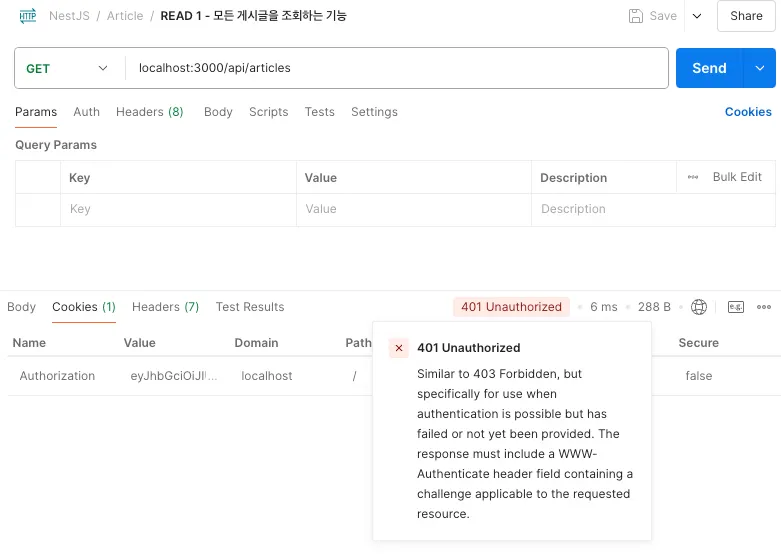
로그인 후 쿠키(JWT)가 있는 상태인데 5초정도 이후 로그인 상태가 해지되었다.
•
이는 만료 시간과 관련있을 것이라 생각해서 문제점을 살펴보았다.
•
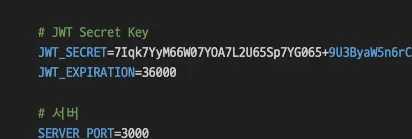
.env 파일에 분명히 36000으로 1시간으로 설정 해둔 부분이 적용이 되지 않는 문제로 보인다.
•
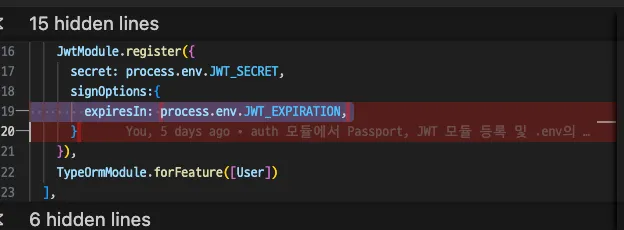
결과, dotenv를 통해 만료 시간을 설정하던 모듈 부분에서의 오류인 것으로 확인되었다.
◦
dotenv로 .env 파일의 환경변수 값을 불러오면 값은 문자열 타입이다.
◦
따라서 강제 형변환을 통해 parseInt()로 랩핑하여 숫자 타입으로 변경했다.
import { Module } from '@nestjs/common';
import { AuthController } from './auth.controller';
import { AuthService } from './auth.service';
import { TypeOrmModule } from '@nestjs/typeorm';
import { User } from "src/user/user.entity";
import { JwtModule } from '@nestjs/jwt';
import { PassportModule } from '@nestjs/passport';
import * as dotenv from 'dotenv';
import { JwtStrategy } from './jwt.strategy';
dotenv.config();
@Module({
imports: [
PassportModule.register({ defaultStrategy: 'jwt' }),
JwtModule.register({
secret: process.env.JWT_SECRET,
signOptions:{
expiresIn: parseInt(process.env.JWT_EXPIRATION, 10)
}
}),
TypeOrmModule.forFeature([User])
],
controllers: [AuthController],
providers: [AuthService, JwtStrategy],
exports: [JwtModule, PassportModule],
})
export class AuthModule {}
TypeScript
복사
•
POSTMAN을 통한 테스트
◦
이제 오랜 시간동안 로그인 상태를 유지하는 것을 확인했다.

Related Posts
Search