소셜 로그인 기능 구현 및 배포환경에서의 테스트
Table of Content
클라이언트 약식 소셜 로그인(OAuth)을 백엔드 서버 중심 인증방식으로 변경
•
보안 및 관례상 프로덕션 환경에서는 Credential 획득 및 관리를 백엔드에서 처리하는 것이 일반적인 관례이자 더 안전한 방식
•
따라서 이전 클라이언트 사이드로 Credential을 전달하던 약식 구현에서 백엔드 중앙집중식 구현으로 변경하고자 한다.
1. 백엔드에서의 Passport를 통한 구글 로그인 전략 구성
•
백엔드의 기존 JWT 활용 인증/인가 구현의 방식처럼 Passport를 통한 Google Auth Strategy를 추가 구성하려고 한다.
1-1. Google Auth 라이브러리 설치
•
아래 명령어를 통해 Google 인증 모듈을 설치할 수 있다. 이는 카카오 로그인 처럼 해당 모듈에 이미 정의된 내장 함수들을 통해 쉽고 빠르게 구현 할 수 있다.
npm install passport-google-oauth20
Shell
복사
npm install --save-dev @types/passport-google-oauth20
Shell
복사
1-2. GoogleStrategy 생성
•
기존 인증전략 파일이 모여있는 곳에 아래 코드를 작성한다.
•
src/auth/strategies/google.strategy.ts
•
여기서 처음 구글 애플리케이션을 생성 하고 기록해둔 .env의 GOOGLE_CLIENT_ID, GOOGLE_CLIENT_SECRET, GOOGLE_REDIRECT_URI 를 모두 사용하게 된다. 해당 파일은 특히 은닉화에 신경써야 한다.
import { Injectable, Logger, UnauthorizedException } from '@nestjs/common';
import { PassportStrategy } from '@nestjs/passport';
import { Strategy, VerifyCallback } from 'passport-google-oauth20';
import { AuthService } from '../auth.service';
import { Profile } from 'passport';
@Injectable()
export class GoogleStrategy extends PassportStrategy(Strategy, 'google') {
private readonly logger = new Logger(GoogleStrategy.name);
constructor(
private readonly authService: AuthService,
) {
super({
clientID: process.env.GOOGLE_CLIENT_ID, // Google 클라이언트 ID
clientSecret: process.env.GOOGLE_CLIENT_SECRET, // Google 클라이언트 시크릿
callbackURL: process.env.GOOGLE_REDIRECT_URI, // Google 리디렉션 URI
scope: ['profile', 'email'], // 요청할 사용자 정보 범위
});
}
async validate(accessToken: string, refreshToken: string, profile: Profile, done: VerifyCallback): Promise<any> {
this.logger.debug('Google Profile:', profile);
try {
const { emails, displayName } = profile;
const email = emails?.[0]?.value;
if (!email) {
throw new UnauthorizedException('Google 계정에 이메일 정보가 없습니다.');
}
// AuthService의 signInWithGoogle 메서드를 활용하여 사용자 조회 또는 생성
const user = await this.authService.findOrCreateGoogleUser({
email,
name: displayName,
});
if (!user) {
return done(null, false);
}
return done(null, user); // 사용자 객체 반환
} catch (error) {
this.logger.error('Google 로그인 검증 실패:', error);
return done(error, false);
}
}
}
TypeScript
복사
1-3. Callback(Redirection) URI 체크
•
구글 개발자 애플리케이션 콘솔에서 콜백URI를 다시 점검한다.
•
기존 코드들과 통일성을 위해서 아래와 같은 엔드포인트 규칙으로 통일했다.
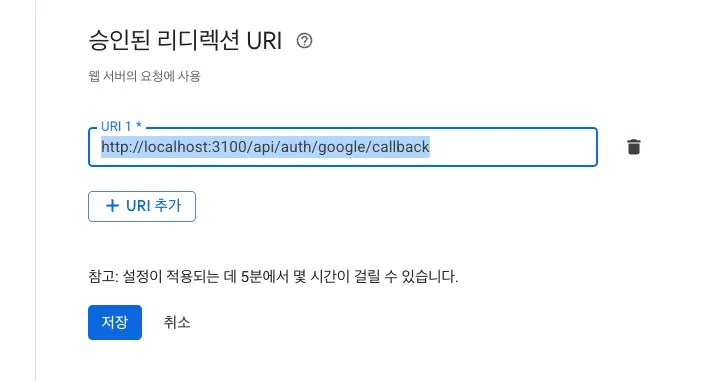
GOOGLE_REDIRECT_URI=http://localhost:3100/api/auth/google/callback
Shell
복사
1-4. GoogleAuthGuard 생성
•
Google 로그인과 카카오 로그인은 모두 OAuth 2.0 기반의 소셜 로그인 방식이므로, Passport를 사용하여 인증 흐름을 추상화하고 관리하는 방식을 사용하게 된다.
•
따라서 각 소셜 플랫폼에 특화된 Passport 전략 패키지를 사용하고, 해당 전략을 실행하는 AuthGuard를 만들어서 NestJS 애플리케이션에 통합하기 위하여 Guard를 생성한다.
◦
현재는 구글 로그인이지만 카카오 로그인 구현시에도 아래와 같은 가드를 추가하면 된다.
◦
이전 카카오 로그인 구현 방식은 직접 accesstoken을 호출 하는 등 passport의 내장 기능을 활용하지 않았다면, 이번 구현을 통해 많은 코드들을 절약 할 수 있다.
◦
유지보수성을 위해서는 Guard를 통해 passport를 활용하는 현재와 같은 구현을 권장한다.
◦
특히 strategy 소스코드에서 validate를 진행하는 것이 옳은 구현 방식이다.
•
src/auth/custom-guards-decorators/google-auth.guard.ts
import { Injectable } from '@nestjs/common';
import { AuthGuard } from '@nestjs/passport';
@Injectable()
export class GoogleAuthGuard extends AuthGuard('google') {
constructor() {
super();
}
}
TypeScript
복사
1-5. AuthModule 수정
•
위 구글 로그인 모듈을 컨트롤러가 사용할 수 있도록 설정
import { Global, Module } from '@nestjs/common';
import { AuthService } from './auth.service';
import { AuthController } from './auth.controller';
import { JwtStrategy } from './strategies/jwt.strategy';
import { User } from '../users/entities/user.entity';
import { TypeOrmModule } from '@nestjs/typeorm';
import { JwtModule } from '@nestjs/jwt';
import { RolesGuard } from './custom-guards-decorators/roles.guard';
import { UsersModule } from '../users/users.module';
import { PassportModule } from '@nestjs/passport';
import { GoogleAuthGuard } from './custom-guards-decorators/google-auth.guard';
import { GoogleStrategy } from './strategies/google.strategy';
@Global()
@Module({
imports: [
UsersModule,
PassportModule.register({ defaultStrategy: 'jwt' }),
TypeOrmModule.forFeature([User]),
JwtModule.register({
secret: process.env.JWT_SECRET,
signOptions: { expiresIn: '1h' },
}),
],
providers: [
AuthService,
JwtStrategy,
RolesGuard,
GoogleAuthGuard,
GoogleStrategy,
],
controllers: [AuthController],
exports: [AuthService, PassportModule, RolesGuard],
})
export class AuthModule {}
TypeScript
복사
1-6. AuthController 수정
•
src/auth/auth.controller.ts
import { BadRequestException, Body, ConflictException, Controller, HttpStatus, Logger, Post, Res, Get, UseGuards, Req, UnauthorizedException } from '@nestjs/common';
import { AuthService } from './auth.service';
import { SignInRequestDto } from './dto/sign-in-request.dto';
import { Response } from 'express';
import { ApiResponseDto } from 'src/common/api-response-dto/api-response.dto';
import { CreateUserRequestDto } from 'src/users/dto/create-user-request.dto';
import { UsersService } from 'src/users/users.service';
import { Request } from 'express';
import { GoogleAuthGuard } from './custom-guards-decorators/google-auth.guard';
import { User } from 'src/users/entities/user.entity';
@Controller('api/auth')
export class AuthController {
private readonly logger = new Logger(AuthController.name);
private readonly frontendUrl: string;
constructor(
private authService: AuthService,
private usersService: UsersService,
) {
this.frontendUrl = process.env.FRONTEND_URL || 'http://localhost:4200';
}
// Sign-Up
@Post('/signup')
async createUser(
@Body() createUserRequestDto: CreateUserRequestDto
): Promise<ApiResponseDto<void>> {
this.logger.verbose(`Visitor is trying to create a new account with email: ${createUserRequestDto.email}`);
try {
await this.usersService.createUser(createUserRequestDto);
this.logger.verbose(`New account created Successfully`);
return new ApiResponseDto(true, HttpStatus.CREATED, '회원가입이 완료되었습니다.');
} catch (error) {
if (error instanceof ConflictException) {
throw new ConflictException(error.message);
} else if (error instanceof BadRequestException) {
throw new BadRequestException(error.message);
}
throw new BadRequestException('회원가입 중 오류가 발생했습니다.');
}
}
// Sign-In
@Post('/signin')
async signIn(
@Body() signInRequestDto: SignInRequestDto,
@Res() res: Response
): Promise<void> {
this.logger.verbose(`User with email: ${signInRequestDto.email} is trying to sign in`);
try {
const user = await this.authService.signIn(signInRequestDto);
const jwtToken = await this.authService.generateJwt(user);
this.logger.verbose(`User with email: ${signInRequestDto.email} issued JWT ${jwtToken}`);
res.setHeader('Authorization', `Bearer ${jwtToken}`);
const response = new ApiResponseDto(true, HttpStatus.OK, 'User logged in successfully', { jwtToken });
res.send(response);
} catch (error) {
this.logger.error(`Sign-in failed: ${error.message}`);
res.status(HttpStatus.UNAUTHORIZED).send(new ApiResponseDto(false, HttpStatus.UNAUTHORIZED, '이메일 또는 비밀번호를 확인해주세요.'));
}
}
@Get('/google/login')
@UseGuards(GoogleAuthGuard)
async googleAuth() {
this.logger.verbose(`User is trying to Google social sign-in`);
// Google 로그인 페이지로 리디렉션 (Passport가 처리)
}
@Get('/google/callback')
@UseGuards(GoogleAuthGuard)
async googleAuthRedirect(@Req() req: Request, @Res() res: Response): Promise<void> {
this.logger.verbose(`Processing Google authentication callback`);
if (!req.user) {
this.logger.error(`Google authentication failed, req.user is null`);
return res.redirect(`${this.frontendUrl}/auth/sign-in?error=google_auth_failed`);
}
try {
const jwtToken = await this.authService.generateJwt(req.user as User); // User 타입 캐스팅
this.logger.verbose(`Google authentication successful for user, JWT issued.`);
// JWT 토큰을 쿼리 파라미터로 프론트엔드 콜백 URL에 추가
const callbackUrlWithToken = `${this.frontendUrl}/auth/google-callback?jwtToken=Bearer ${jwtToken}`;
// 헤더에 토큰을 담지 않고, 쿼리 파라미터로 리디렉션
return res.redirect(callbackUrlWithToken);
} catch (error) {
this.logger.error(`Error processing Google callback for user: ${req.user ? (req.user as any).id : 'unknown'}`, error.stack);
return res.redirect(`${this.frontendUrl}/auth/sign-in?error=jwt_generation_failed`);
}
}
}
TypeScript
복사
1-7. AuthService 수정
•
기존 로그인과는 다르게 소셜로그인은 회원이 없는 경우 자동 회원가입을 진행하는 로직이 필요하다.
import { Injectable, Logger, UnauthorizedException } from '@nestjs/common';
import * as bcrypt from 'bcryptjs';
import { SignInRequestDto } from './dto/sign-in-request.dto';
import { JwtService } from '@nestjs/jwt';
import { UsersService } from 'src/users/users.service';
import { UserRole } from 'src/users/entities/user-role.enum';
import { CreateGoogleUserRequestDto } from 'src/users/dto/create-google-user-request.dto';
import { User } from 'src/users/entities/user.entity';
@Injectable()
export class AuthService {
private readonly logger = new Logger(AuthService.name);
private readonly googleClientId: string;
constructor(
private jwtService: JwtService,
private userService: UsersService,
) {
this.googleClientId = process.env.GOOGLE_CLIENT_ID;
}
// Sign-In
async signIn(
signInRequestDto: SignInRequestDto
): Promise<User> {
this.logger.verbose(`User with email: ${signInRequestDto.email} is signing in`);
const { email, password } = signInRequestDto;
try {
const existingUser = await this.userService.findUserByEmail(email);
if (!existingUser || !(await bcrypt.compare(password, existingUser.password))) {
throw new UnauthorizedException('Invalid credentials');
}
this.logger.verbose(`User with email: ${signInRequestDto.email} found`);
return existingUser;
} catch (error) {
this.logger.error(`Invalid credentials or Internal Server error`);
throw error;
}
}
async findOrCreateGoogleUser(googleProfile: { email: string, name: string }): Promise<User | null> {
const { googleId, email, name } = googleProfile;
let existingUser = await this.userService.findUserByEmail(email).catch(() => null);
if (!existingUser) {
const createGoogleUserRequestDto: CreateGoogleUserRequestDto = {
email,
username: name || email.split('@')[0],
role: UserRole.STUDENT,
};
await this.userService.createUserByGoogle(createGoogleUserRequestDto);
existingUser = await this.userService.findUserByEmail(email);
}
return existingUser;
}
async generateJwt(user: User): Promise<string> {
const payload = {
id: user.id,
email: user.email,
username: user.username,
role: user.role,
};
return await this.jwtService.sign(payload);
}
}
TypeScript
복사
1-8. 백엔드 작동 테스트
•
•
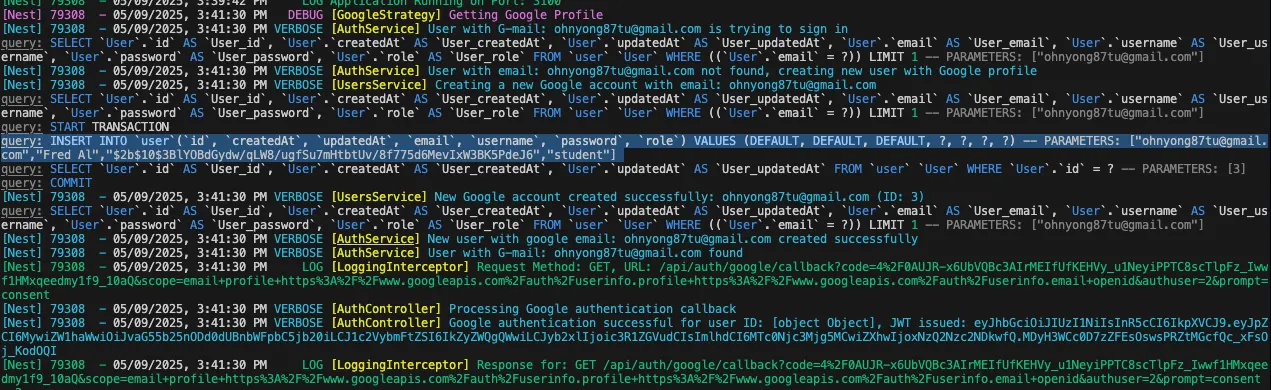
로그인 페이지 정상 작동
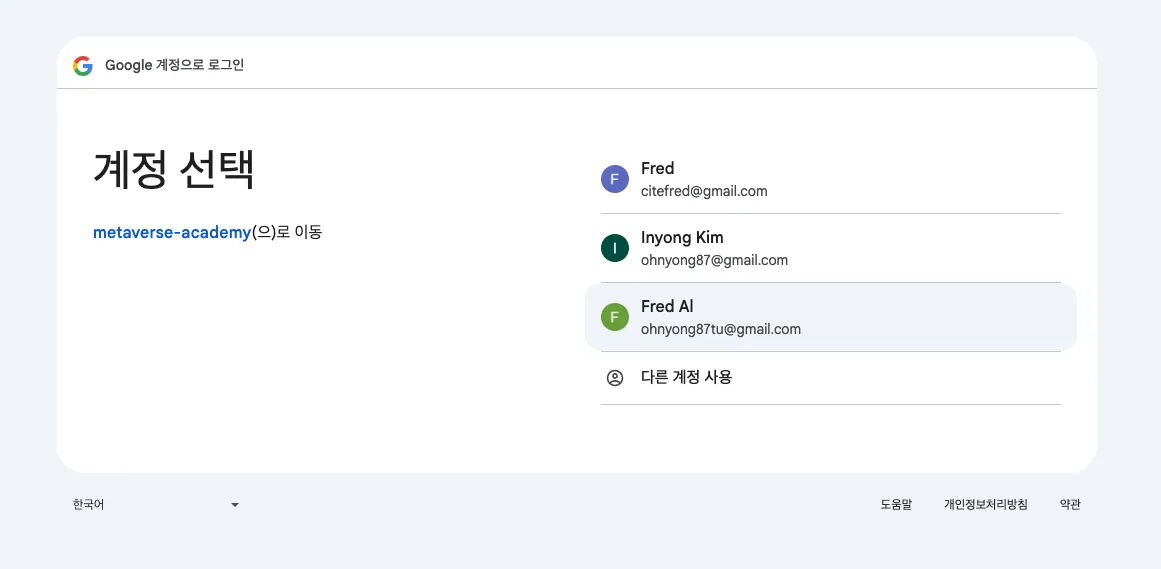
•
처음 접근하는 계정으로 회원 가입 진행 확인(Insert문)
•
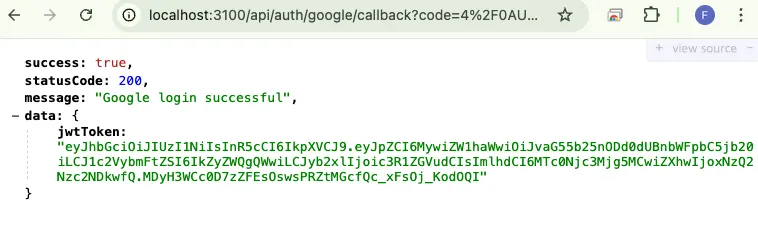
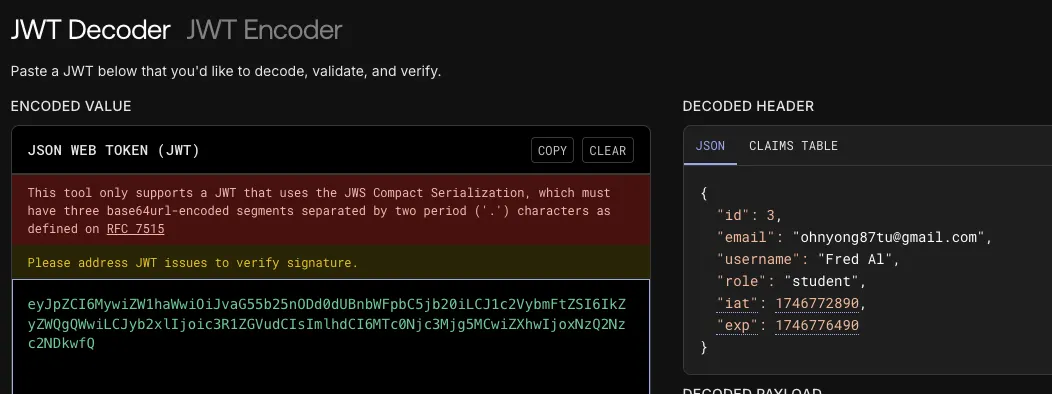
결과 콜백 페이지로 JWT 토큰 발급 확인
2. 프론트엔드에서의 기존 로직 수정
•
프론트 엔드에서는 기존에 Credential을 직접 호출하는 보안상 취약한 로직이 존재했다. 해당 부분을 모두 백엔드 중앙 집중식으로 변경했으므로 간단히 요청만 하고 응답 JWT토큰을 저장하는 책임으로 변경한다.
2-1. Callback을 받을 수 있는 컴포넌트 추가
•
백엔드에서 Callback으로 jwt토큰을 쿼리파라미터로 응답하게되는데 중간 부분에 이 토큰을 스토리지에 저장할 중간 페이지가 필요하다.
•
실제 렌더링될 뷰 페이지까지 필요하지는 않을 수 있지만 로딩화면 또는 오류를 처리할 페이지 구성이 필요하기 때문에 추가했다.
•
google.component.ts 실제로는 이 부분이 쿼리로 전달된 JWT토큰을 저장하고 메인 페이지 등으로 리다이렉션 해주는 역할을 한다.
import { Component, OnInit } from '@angular/core';
import { ActivatedRoute, Router } from '@angular/router';
import { AuthService } from 'src/app/core/services/auth/auth.service';
@Component({
selector: 'app-google-callback',
templateUrl: './google-callback.component.html',
styleUrls: ['./google-callback.component.scss']
})
export class GoogleCallbackComponent implements OnInit {
constructor(
private route: ActivatedRoute,
private router: Router,
private authService: AuthService
) { }
ngOnInit(): void {
const jwtToken = this.route.snapshot.queryParamMap.get('jwtToken');
console.log('Google login callback: ', jwtToken);
if (jwtToken) {
this.authService.saveToken(jwtToken);
console.log('Token saved successfully.');
window.location.href = '/';
} else {
console.error('Google login callback: Token not found in URL query parameters.');
this.router.navigate(['/auth/sign-in'], { queryParams: { error: 'google_token_missing' } });
}
}
}
TypeScript
복사
◦
google.component.html 간략한 로딩화면을 구성(실제로 나타나지 않는 것이 정상적인 응답 속도)
<div class="m-auto">
<button
type="button"
class="inline-flex cursor-not-allowed items-center rounded-md bg-primary px-4 py-2 text-sm font-semibold leading-6 text-primary-foreground shadow transition duration-150 ease-in-out"
disabled="">
<svg
class="-ml-1 mr-3 h-5 w-5 animate-spin"
xmlns="http://www.w3.org/2000/svg"
fill="none"
viewBox="0 0 24 24">
<circle class="opacity-25" cx="12" cy="12" r="10" stroke="currentColor" stroke-width="4"></circle>
<path
class="opacity-75"
fill="currentColor"
d="M4 12a8 8 0 018-8V0C5.373 0 0 5.373 0 12h4zm2 5.291A7.962 7.962 0 014 12H0c0 3.042 1.135 5.824 3 7.938l3-2.647z"></path>
</svg>
Loading...
</button>
</div>
HTML
복사
◦
이 부분을 추가했기 때문에 모듈과 라우터에서도 해당 컴포넌트 의존성 주입과 라우팅 경로를 설정해준다.
◦
auth.module.ts
import { NgModule } from '@angular/core';
import { provideHttpClient, withInterceptorsFromDi } from '@angular/common/http';
import { AngularSvgIconModule } from 'angular-svg-icon';
import { AuthRoutingModule } from './auth-routing.module';
import { UserService } from 'src/app/core/services/users/users.service';
import { FormsModule, ReactiveFormsModule } from '@angular/forms';
import { RouterLink } from '@angular/router';
import { ButtonComponent } from 'src/app/core/components/button/button.component';
import { SignUpComponent } from './sign-up/sign-up.component';
import { SignInComponent } from './sign-in/sign-in.component';
import { NgClass, NgIf } from '@angular/common';
import { AuthService } from 'src/app/core/services/auth/auth.service';
import { ToastComponent } from 'src/app/core/components/toast/toast.component';
import { GoogleCallbackComponent } from './google-callback/google-callback.component';
@NgModule({
imports: [
FormsModule,
ReactiveFormsModule,
NgClass,
NgIf,
RouterLink,
ButtonComponent,
ToastComponent,
AuthRoutingModule,
AngularSvgIconModule.forRoot(),
],
providers: [
provideHttpClient(withInterceptorsFromDi()),
UserService,
AuthService,
],
declarations: [
SignUpComponent,
SignInComponent,
GoogleCallbackComponent,
]
})
export class AuthModule {}
TypeScript
복사
◦
auth-routing.module.ts
import { NgModule } from '@angular/core';
import { RouterModule, Routes } from '@angular/router';
import { AuthComponent } from './auth.component';
import { SignInComponent } from './sign-in/sign-in.component';
import { ForgotPasswordComponent } from './forgot-password/forgot-password.component';
import { SignUpComponent } from './sign-up/sign-up.component';
import { NewPasswordComponent } from './new-password/new-password.component';
import { TwoStepsComponent } from './two-steps/two-steps.component';
import { SignOutComponent } from './sign-out/sign-out.component';
import { GoogleCallbackComponent } from './google-callback/google-callback.component';
const routes: Routes = [
{
path: '',
component: AuthComponent,
children: [
{ path: '', redirectTo: 'sign-in', pathMatch: 'full' },
{ path: 'sign-in', component: SignInComponent, data: { returnUrl: window.location.pathname } },
{ path: 'sign-out', component: SignOutComponent },
{ path: 'sign-up', component: SignUpComponent },
{ path: 'google-callback', component: GoogleCallbackComponent },
{ path: 'forgot-password', component: ForgotPasswordComponent },
{ path: 'new-password', component: NewPasswordComponent },
{ path: 'two-steps', component: TwoStepsComponent },
{ path: '**', redirectTo: 'sign-in', pathMatch: 'full' },
],
},
];
@NgModule({
imports: [RouterModule.forChild(routes)],
exports: [RouterModule],
})
export class AuthRoutingModule {}
TypeScript
복사
2-2. Sign-In, Sign-Up 페이지의 수정
•
기존 클라이언트에 인증/인가 로직이 집중된 것 보다 간략하게 변경된다.
•
실제로는 백엔드의 구글 로그인 페이지 라우터로 접근하는 것으로 프론트엔드의 역할에 맞게 수정된다.
•
따라서 복잡한 로직때문에 컴포넌트로 분리했었던 버튼도 불필요하여 제거했으며, onClick 이벤트 함수 정도로 마무리된다.
•
sign-in.component.html
<app-toast [message]="errorMessage"></app-toast>
<div class="my-10 space-y-6">
<div class="text-center">
<h2 class="mb-1 text-3xl font-semibold text-foreground">Hello Again <span class="text-primary">!</span></h2>
<p class="text-sm text-muted-foreground">Enter your credential to access your account.</p>
</div>
<!-- Oauth 2.0 Google -->
<div>
<app-button (click)="onGoogleSignIn()" full impact="bold" tone="light" shape="rounded" size="medium">
<svg-icon src="assets/icons/google-logo.svg" [svgClass]="'h-6 w-6 mr-2'"> </svg-icon>
Sign In with Google
</app-button>
</div>
...
</div>
HTML
복사
•
sign-up.component.html
<app-toast [message]="errorMessage"></app-toast>
<div class="my-10 space-y-6">
<div class="text-center">
<h2 class="mb-1 text-3xl font-semibold text-foreground">Sign Up <span class="text-primary">!</span></h2>
<p class="text-sm text-muted-foreground">Let's get started with your passion.</p>
</div>
<!-- Oauth 2.0 Google -->
<div>
<app-button (click)="onGoogleSignIn()" full impact="bold" tone="light" shape="rounded" size="medium">
<svg-icon src="assets/icons/google-logo.svg" [svgClass]="'h-6 w-6 mr-2'"> </svg-icon>
Sign Up & Sign In with Google
</app-button>
</div>
...
</div>
HTML
복사
•
각 페이지의 onClick 이벤트인 onGoogleSignIn() 함수는 각 ts파일에 아래와 같이 간단히 요청을 위한 service를 호출하는 것으로 구성된다.
import { Component, ViewChild, ElementRef, OnInit } from '@angular/core';
import { FormBuilder, FormGroup, Validators } from '@angular/forms';
import { Router, ActivatedRoute } from '@angular/router'; // ActivatedRoute 추가
import { SignInRequest } from 'src/app/core/models/auth/sign-in-request.interface';
import { AuthService } from 'src/app/core/services/auth/auth.service';
import { ToastComponent } from 'src/app/core/components/toast/toast.component';
@Component({
selector: 'app-sign-in',
templateUrl: './sign-in.component.html',
styleUrls: ['./sign-in.component.scss'],
})
export class SignInComponent implements OnInit {
signInForm: FormGroup;
errorMessage: string = '';
...
onGoogleSignIn() {
this.authService.initiateGoogleSignIn();
}
...
}
TypeScript
복사
2-3. HTTP 요청부 AuthService 수정
•
기존 HTTP 요청을 담당하는 프론트엔드 서비스 부분 또한 다음처럼 간략하게 정리된다.
•
auth.service.ts
import { HttpClient, HttpHeaders } from "@angular/common/http";
import { BehaviorSubject, map, Observable, tap } from "rxjs";
import { Router } from "@angular/router";
import { AuthResponse } from "../../models/auth/auth-response.interface";
import { Injectable } from "@angular/core";
import { jwtDecode } from 'jwt-decode';
import { DecodedToken } from "../../models/auth/decoded-token.interface";
import { environment } from 'src/environments/environment';
import { CreateUserRequest } from "../../models/users/user-request.interface";
import { UserResponse } from "../../models/users/user-response.interface";
import { ApiResponse } from "../../models/common/api-response.interface";
import { SignInRequest } from "../../models/auth/sign-in-request.interface";
@Injectable({ providedIn: 'root' })
export class AuthService {
private currentUserSubject = new BehaviorSubject<DecodedToken | null>(null);
public currentUser$ = this.currentUserSubject.asObservable();
private apiUrl = environment.apiUrl + '/auth';
private readonly TOKEN_KEY = 'jwtToken';
constructor(private http: HttpClient, private router: Router) {
this.loadUserFromToken();
}
getToken(): string | null {
return sessionStorage.getItem(this.TOKEN_KEY);
}
// 토큰 저장 및 사용자 정보 업데이트
saveToken(jwtToken: string): void {
sessionStorage.setItem(this.TOKEN_KEY, jwtToken);
this.loadUserFromToken();
}
...
// 일반 이메일/비밀번호 로그인
signIn(signInRequestData: SignInRequest): Observable<AuthResponse> {
...
}
initiateGoogleSignIn(): void {
window.location.href = `${this.apiUrl}/google/signin`;
}
signOut(): void {
sessionStorage.removeItem(this.TOKEN_KEY);
this.currentUserSubject.next(null);
this.router.navigate(['/auth/sign-in']);
}
loadUserFromToken(): DecodedToken | null {
const jwtToken = sessionStorage.getItem('jwtToken');
if (jwtToken) {
try {
const decoded = (jwtDecode as (token: string) => DecodedToken)(jwtToken);
this.currentUserSubject.next(decoded);
return decoded;
} catch (error) {
this.currentUserSubject.next(null);
return null;
}
}
return null;
}
// 토큰 만료 여부 확인
isTokenExpired(): boolean {
...
}
}
TypeScript
복사
•
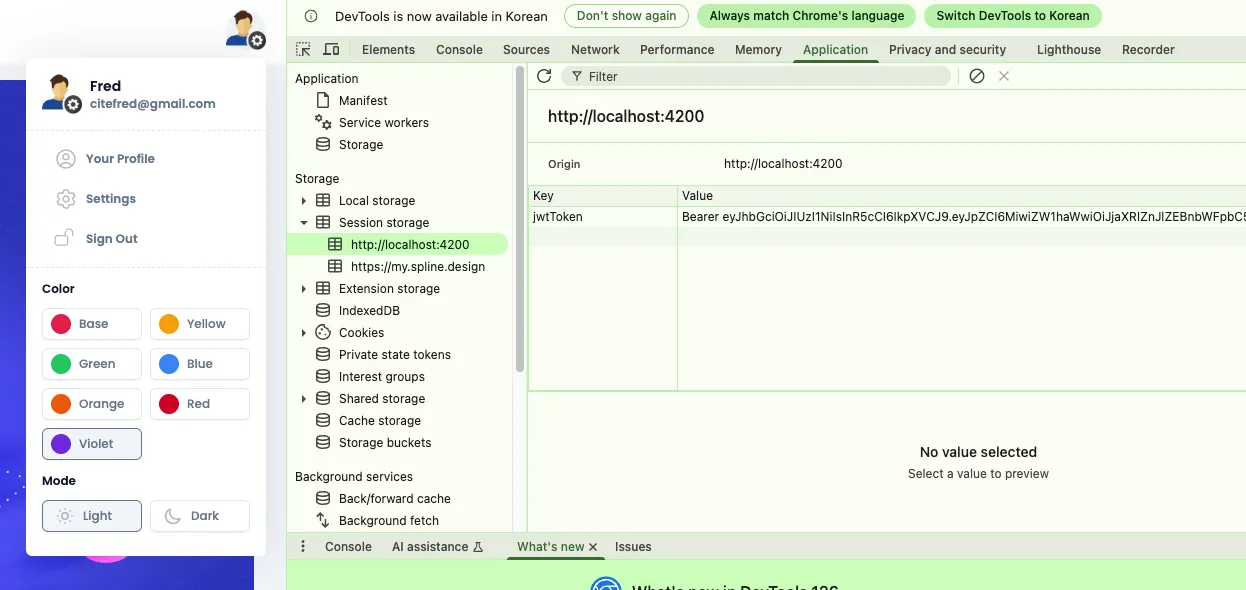
토큰 저장 함수인 saveToken()은 콜백 컴포넌트에서 기존 로그인 방식과 동일하게 호출하여 사용된다.
3. 적용 테스트
•
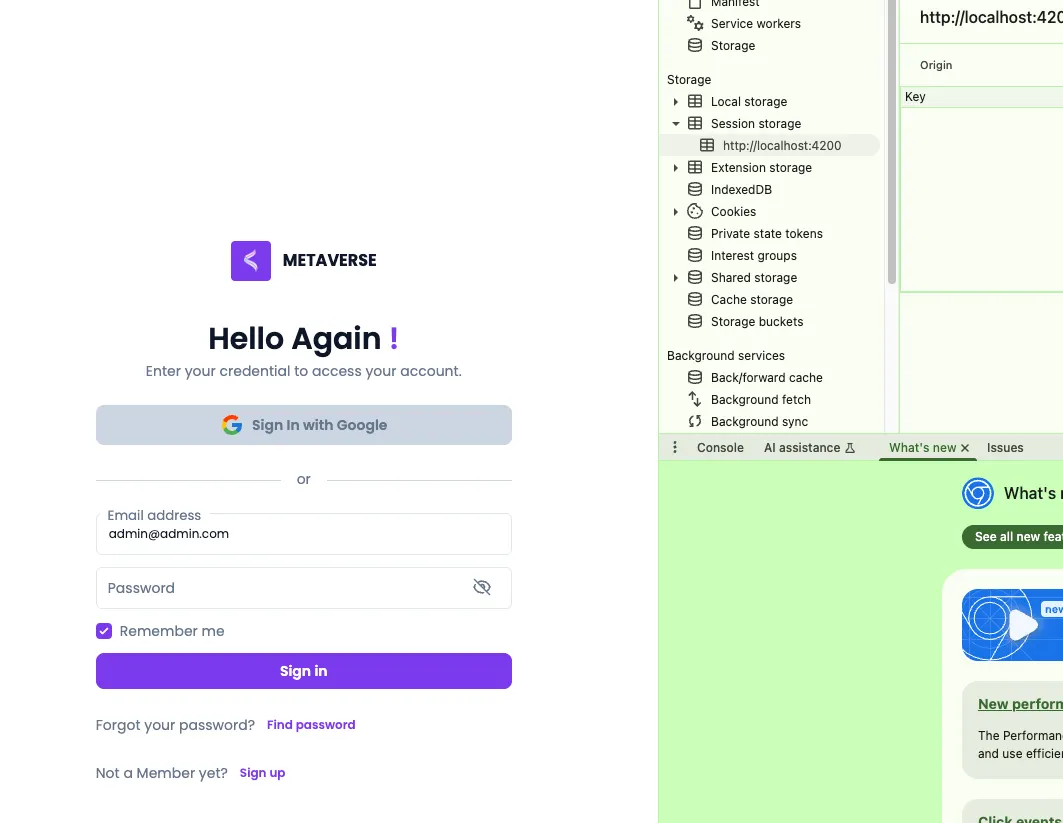
사용자 로그인 페이지 모습
•
구글 로그인 페이지 모습
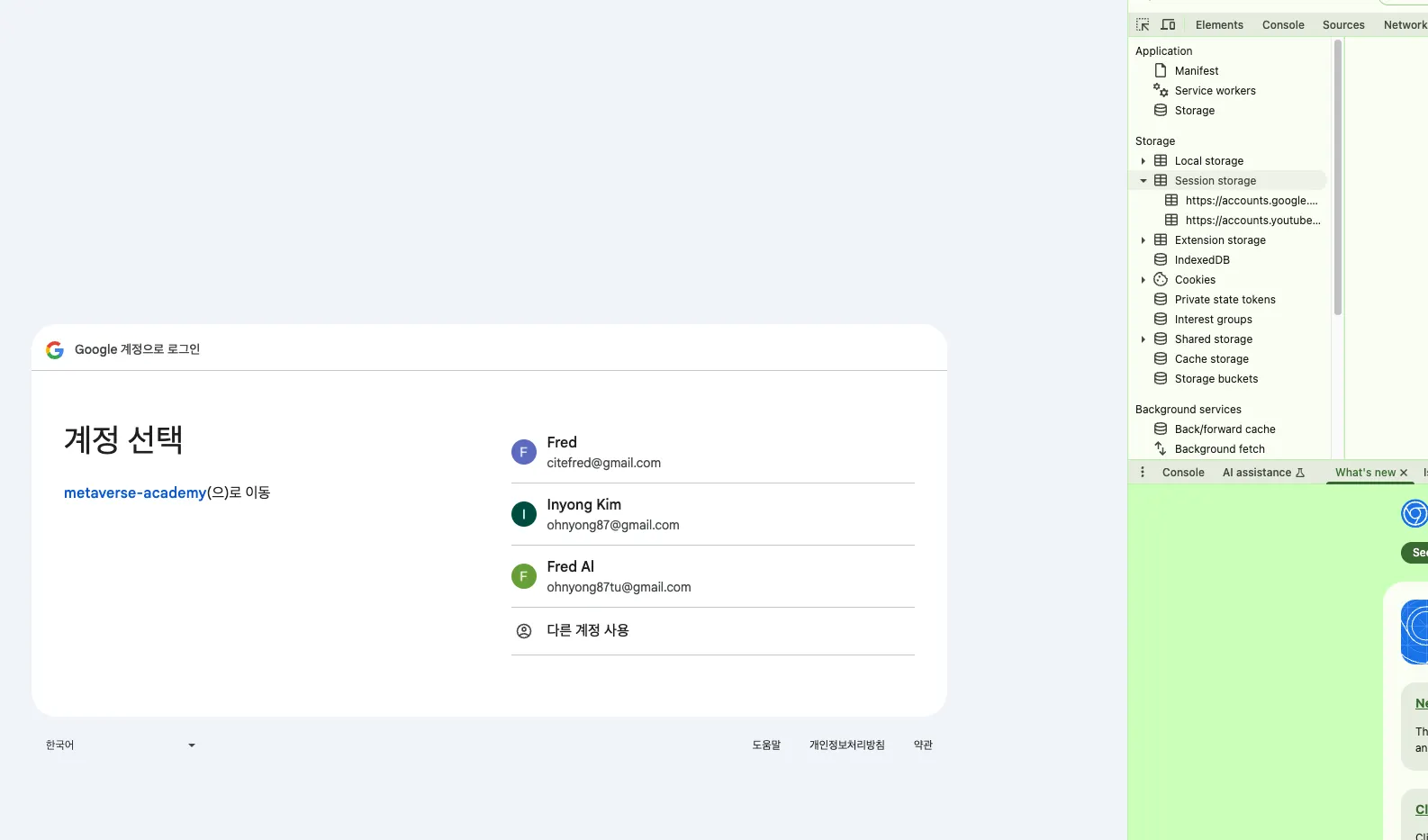
•
구글 로그인 성공 및 토큰 적용 모습
Related Posts
Search